Manuel de l’opérateur
MCP — Operator Manual
AI assistants managing Zedmos firewalls, on each firewall and through the Zedmos Console
- Pour
- Operators and MSPs who let AI assistants read and change their firewalls
- S’applique à
- Zedmos Console 1.3.1 or later; Zedmos firewall releases after 26.10.125
- Mis à jour
- 2026-10-15
17 chapitresRédigé en anglais. L’interface elle-même est en anglais dans toutes les langues.
MCP (the Model Context Protocol) lets an AI assistant — Claude, Cursor, VS Code, Codex, Gemini CLI and others — work with a Zedmos firewall the way an administrator does: read its state, explain what it sees, and, if you allow it, prepare or make changes. Every firewall has its own MCP service.
The console adds one thing on top: a single address,
https://<your console>/mcp, through which one assistant reaches many
firewalls over the internet. Each person makes their own connections
there. The console carries every call to the right firewall over the link
the firewall already keeps open to the console, so no firewall is exposed
and none holds a secret for it.
This manual follows the order in which you set things up. Each chapter says what the feature does, gives the procedure, then lists the controls on the screen.
How to read the pictures. Every picture is a real screen. A blue CONSOLE tag marks the console, a green FIREWALL tag marks the firewall's own web interface. The red numbers in a picture match the numbered list next to it. The examples use the organization Example Hotels, the firewall hotel-fw-01 and the console domain console.example.com. Replace them with your own.
01
What MCP does
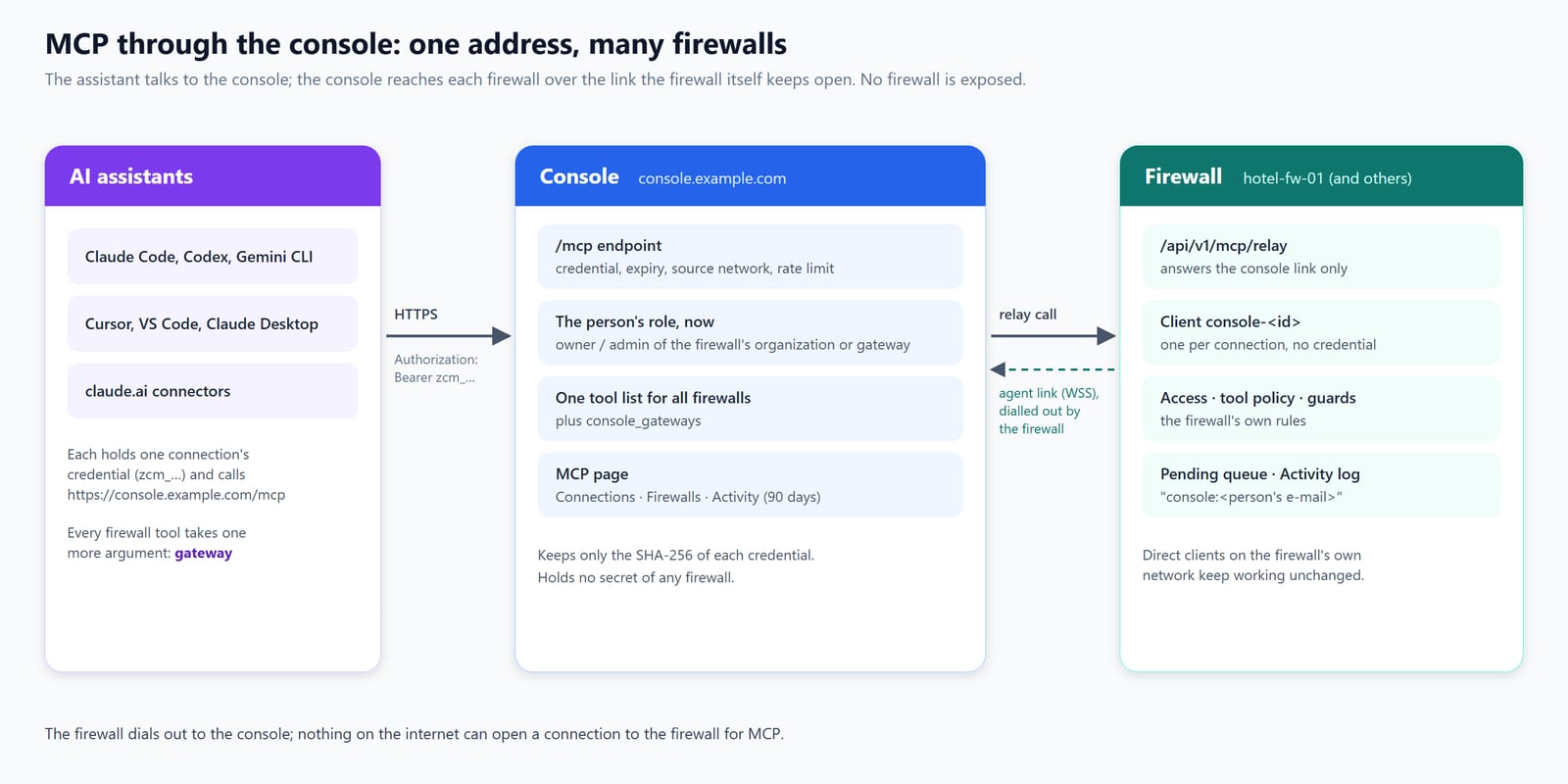
There are two ways to connect an assistant to a firewall.
- Directly, on the firewall's network. Under Services › MCP on the
firewall you add a client for the assistant and download its
connection file. The assistant then talks to
https://<firewall>/api/mcp. This needs the assistant to reach the firewall's address — normally from the LAN. - Through the console, from anywhere. On the console's MCP page you
make a connection: a name, the firewalls it reaches, what the assistant
may do, and how long it lasts. The assistant gets one address,
https://console.example.com/mcp, and one credential. Every firewall tool takes one more argument,gateway, that names the firewall to run it on.
Both ways end in the same place: the firewall's MCP service, with its own rules, its own approval queue and its own log. A console connection is, on each firewall, simply one more client — of the kind Through the console — that the console created for it.
What an assistant can do on a firewall is what the firewall's tools offer (about 840 of them: status, interfaces, firewall rules, aliases, NAT, VPN, DHCP, DNS, hotspot, logs, diagnostics …), narrowed by the access you grant:
| Access | What the assistant may do |
|---|---|
| Read | Status, lists, logs, diagnostics. Always included. |
| Add and change | Create and change rows and settings, preview changes first. |
| Delete | Remove rows, purge, reset, flush. |
Changes and deletions can be proposed (they wait for a person, the default) or applied directly. Some actions — reboot, firmware update, configuration restore, user administration, WAN rules and others — always wait for a person, whatever you choose.
02
How a call travels, and what is checked
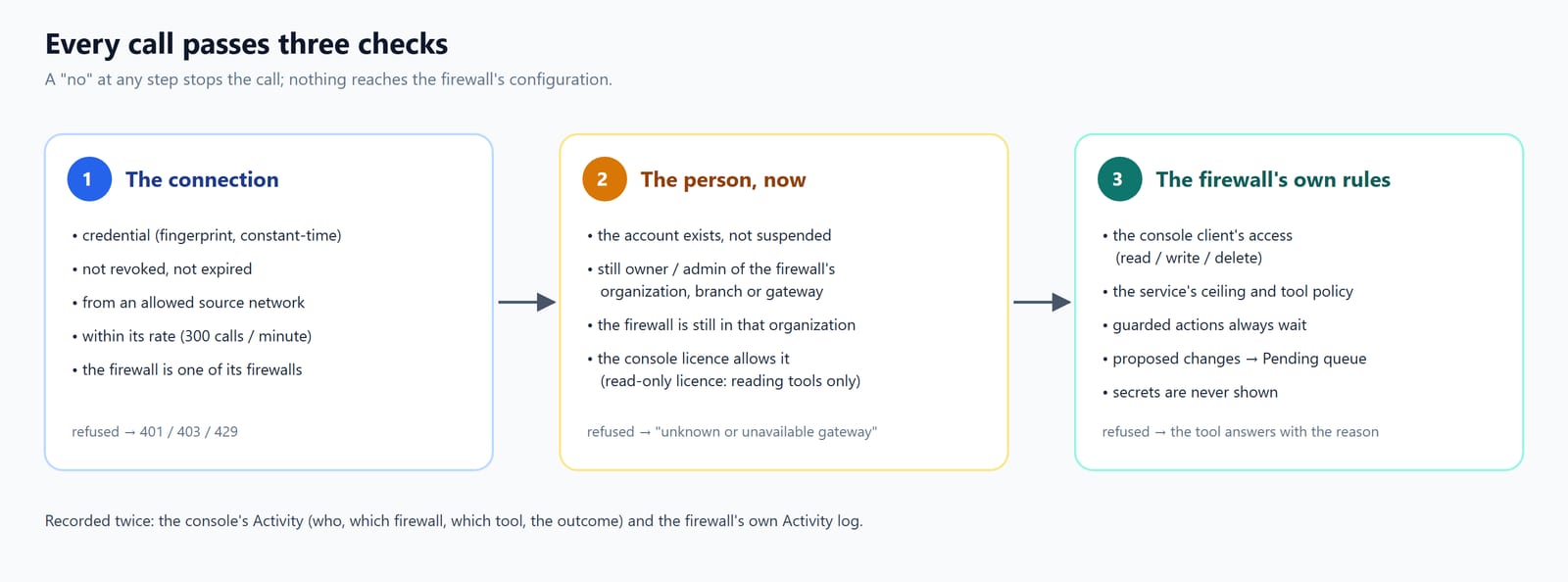
When an assistant calls a tool through the console:
- The connection is checked. The credential is compared with the fingerprint the console keeps; the connection must not be revoked or expired; the request must come from an allowed network (if you set one); the connection must be within its rate; and the named firewall must be one of the connection's firewalls.
- The person is checked — now, not when the connection was made. The account behind the connection must exist and not be suspended, must still be owner or administrator of the firewall's organization (or of its branch or gateway), and the firewall must still belong to that organization. The console's licence is honoured: a read-only licence leaves only the tools that read.
- The firewall decides. The call runs on the firewall as the connection's own client. The firewall applies that client's access, the service's ceiling and tool policy, the guarded categories and the approval setting. A proposed change goes to the firewall's Pending queue.
The call is recorded twice: in the console's Activity (who, which
firewall, which tool, the outcome) and in the firewall's own Activity
log, where the caller reads console:<the person's e-mail>.
03
Before you start
On every firewall that an assistant should reach through the console
- A firmware release after 26.10.125. Older firewalls show Firmware too old in the console and cannot be chosen for a connection.
- The firewall is enrolled in the console and online.
- Its MCP service is on. You can switch it on from the console (chapter 6) or on the firewall (chapter 5).
In the console
- You are the console owner, or owner/administrator of the organization, branch or gateway (chapter 4).
- For assistants that connect from the internet — which they all do when they use the console — nothing else is needed: the console already has a public name and a trusted certificate.
For the assistant
- An assistant that accepts an MCP server over HTTP with a fixed
Authorizationheader: Claude Code, claude.ai / Claude Desktop custom connectors (with request headers), Cursor, VS Code, Codex, Gemini CLI, Cline, Windsurf and similar. ChatGPT's custom connectors accept only OAuth or no authentication, so they cannot use a console connection.
04
Who may do what
| Who | Sees in the MCP page |
|---|---|
| Console owner (MSP) | Every organization and every firewall; everyone's connections and all activity. |
| Owner or administrator of an organization | That organization's firewalls; their own connections and activity. |
| Owner or administrator through a branch or gateway grant | Those firewalls only; their own connections and activity. |
| Viewer | No MCP link. Reading is not managing. |
| Hotspot role only | No MCP link. |
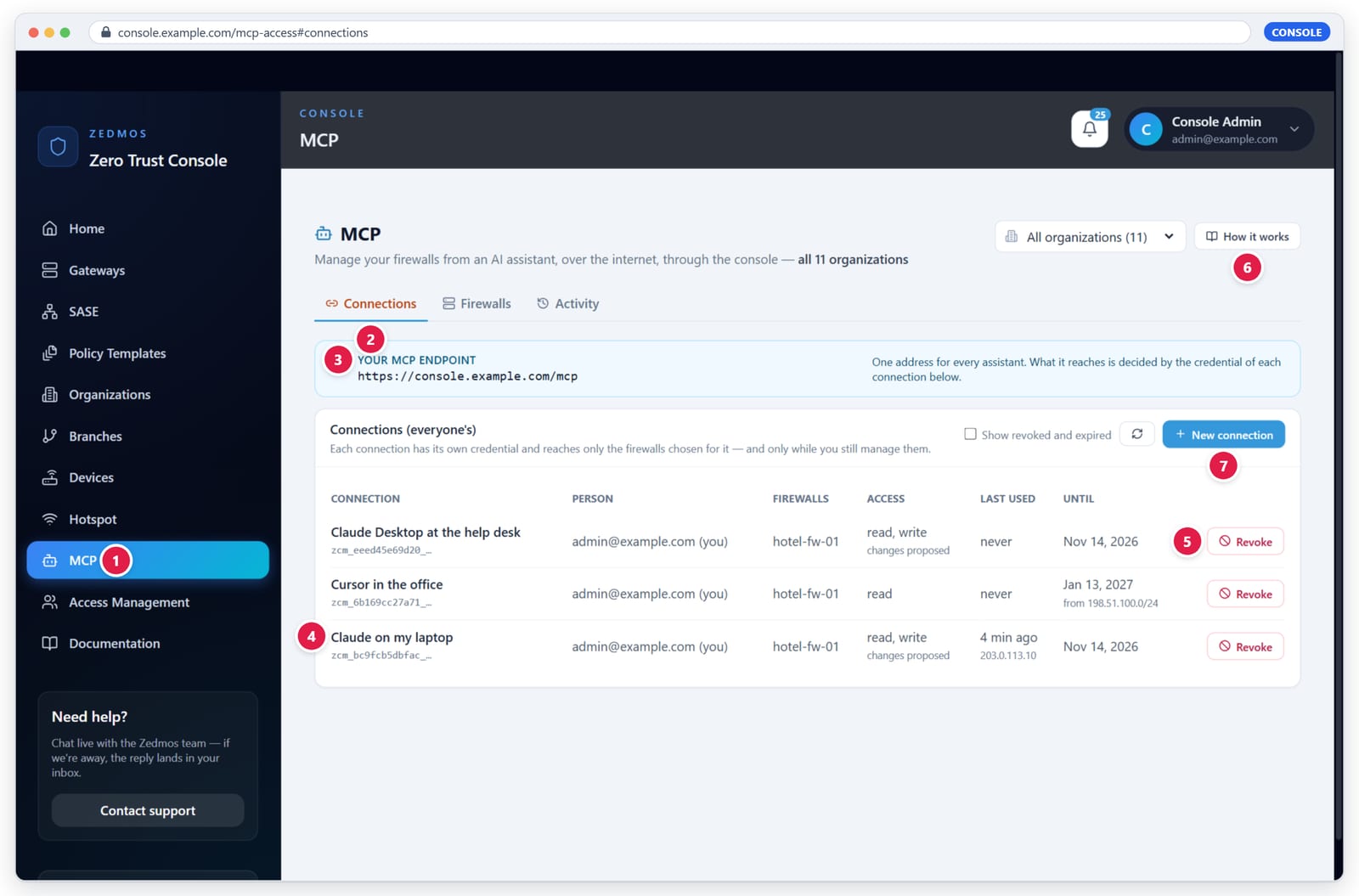
The MCP link appears in the menu only for people who manage at least one firewall (1). Roles are set under Access Management, as for every other page. A change of role takes effect on the next call an assistant makes: take someone's administrator role away and their connections lose those firewalls at that moment.
The page has three tabs:
| Tab | What it is for |
|---|---|
| Connections | Your own address and your connections to the console's MCP endpoint. |
| Firewalls | Each firewall's MCP service: on/off, its clients, its pending changes. |
| Activity | The calls assistants made through the console. |
The organization picker at the top limits Connections and Firewalls to one organization; All organizations shows every one you manage.
05
The firewall's MCP service
Each firewall runs its own MCP service under Services › MCP (AI assistants). The console uses it; you can also manage it on the firewall itself. Its tabs are Settings, Clients, Pending changes, Activity, Tools & policy and Help.
5.1 Settings
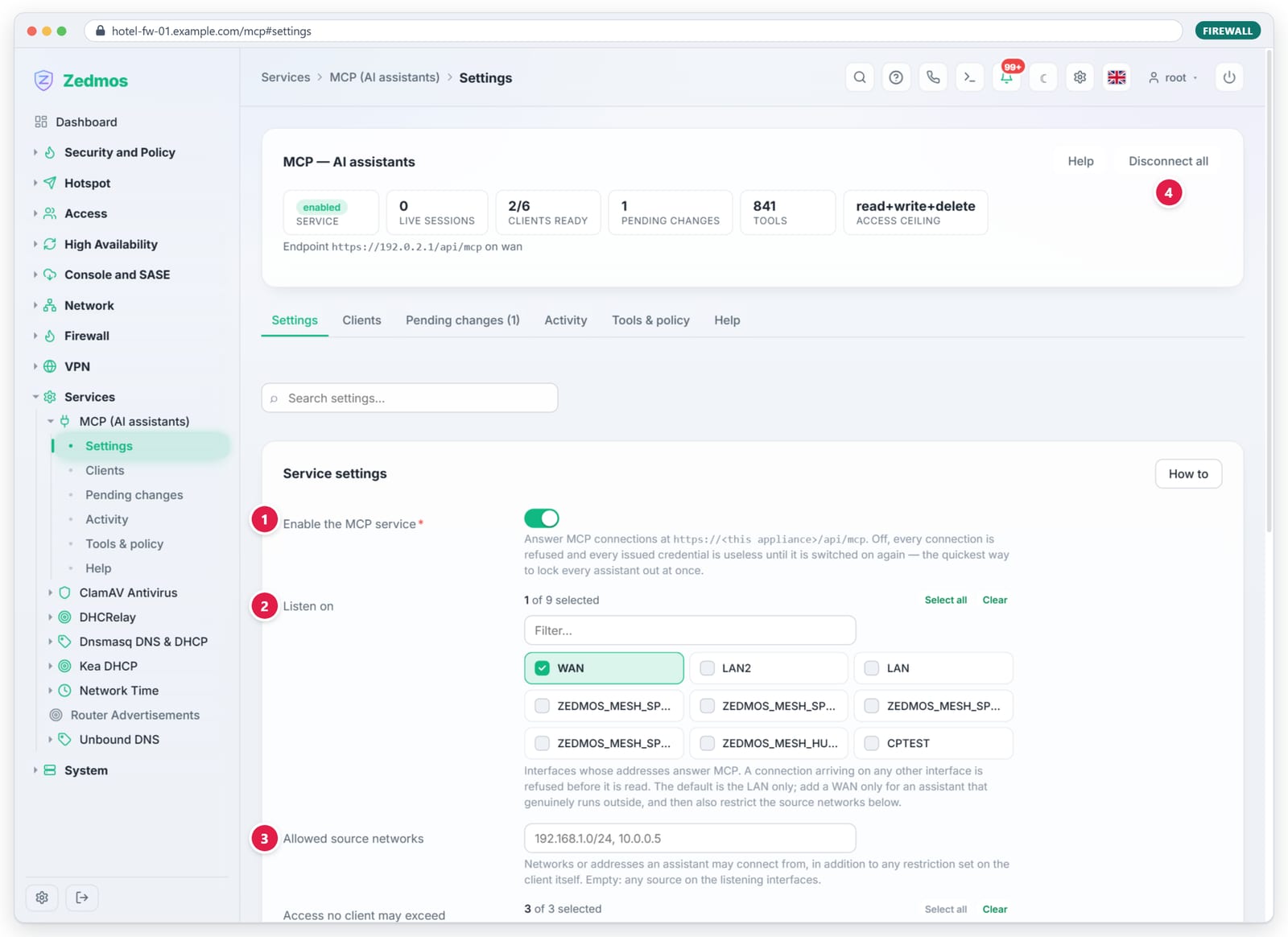
- Enable the MCP service — on, the firewall answers MCP; off, every assistant (direct or through the console) is refused at once. This is the quickest way to lock every assistant out of one firewall.
- Listen on — the interfaces whose addresses answer direct
connections at
https://<firewall>/api/mcp. The default is the LAN. Console connections do not use these interfaces: they arrive over the console link. - Allowed source networks — where direct clients may connect from.
- Disconnect all — ends every live direct session.
Further down: Access no client may exceed (a ceiling for every client, console clients included — remove Delete here and nothing can delete through MCP on this firewall) and the service's own limits.
The cards at the top summarise the service: live sessions, clients ready, pending changes, the number of tools and the access ceiling.
5.2 Clients
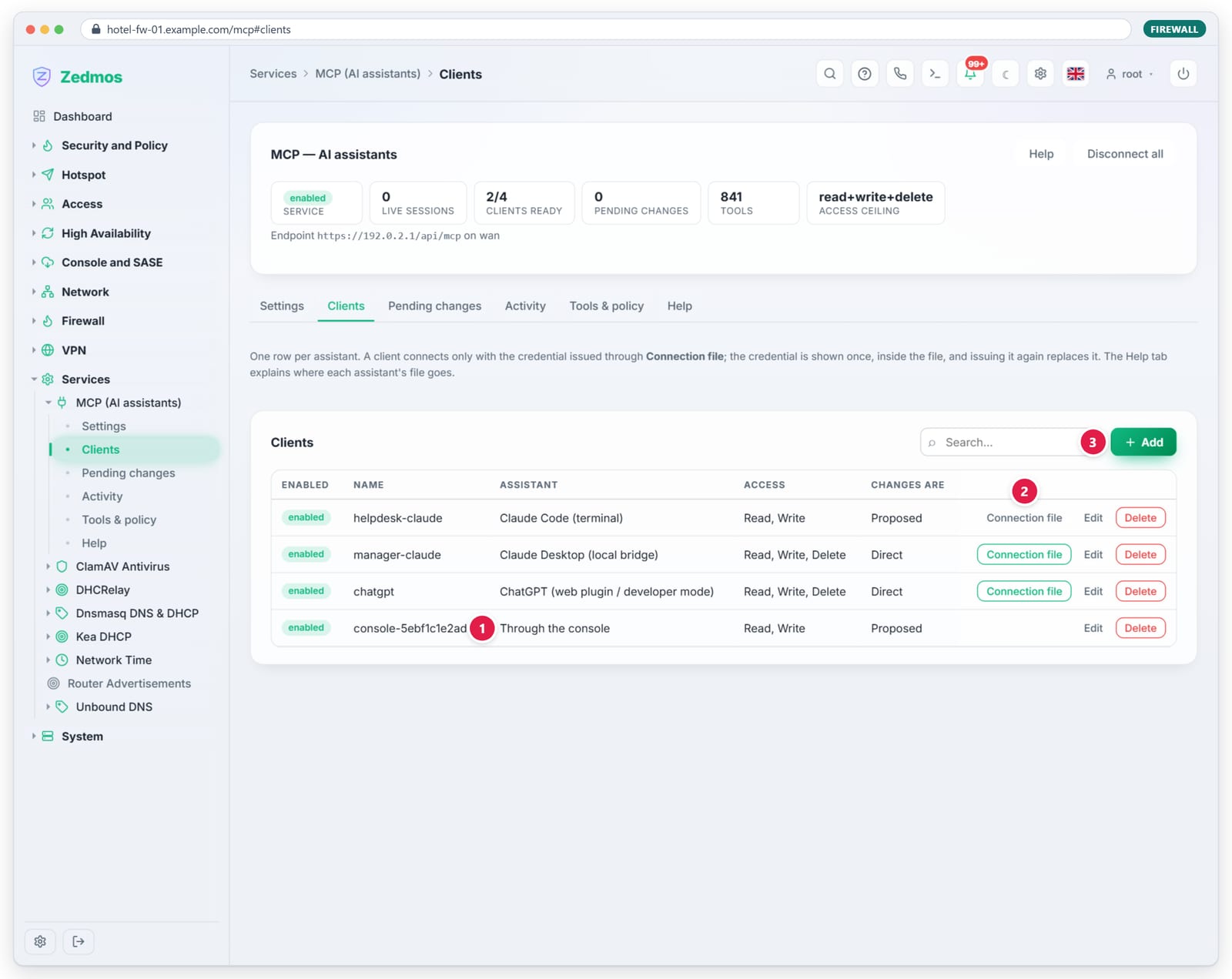
One row per assistant.
- Through the console — clients the console made for its connections,
named
console-<id>. They have no credential and no connection file; the console reaches them over its link. Revoking the connection in the console removes them. You may disable or delete one here — that cuts that connection off this firewall. - Connection file — for a direct client: issues its credential and downloads the file for the assistant (the credential is shown once, inside the file; issuing again replaces it). A highlighted button means a credential is issued.
- Add — a new direct client: name, assistant, access, approval for changes and deletions, credential lifetime, allowed networks.
Each row shows the client's Access (Read, Write, Delete) and whether its changes are Proposed or Direct. Edit opens the rest: deletions, credential lifetime and expiry, allowed networks, privileges and when it was last seen.
5.3 Pending changes
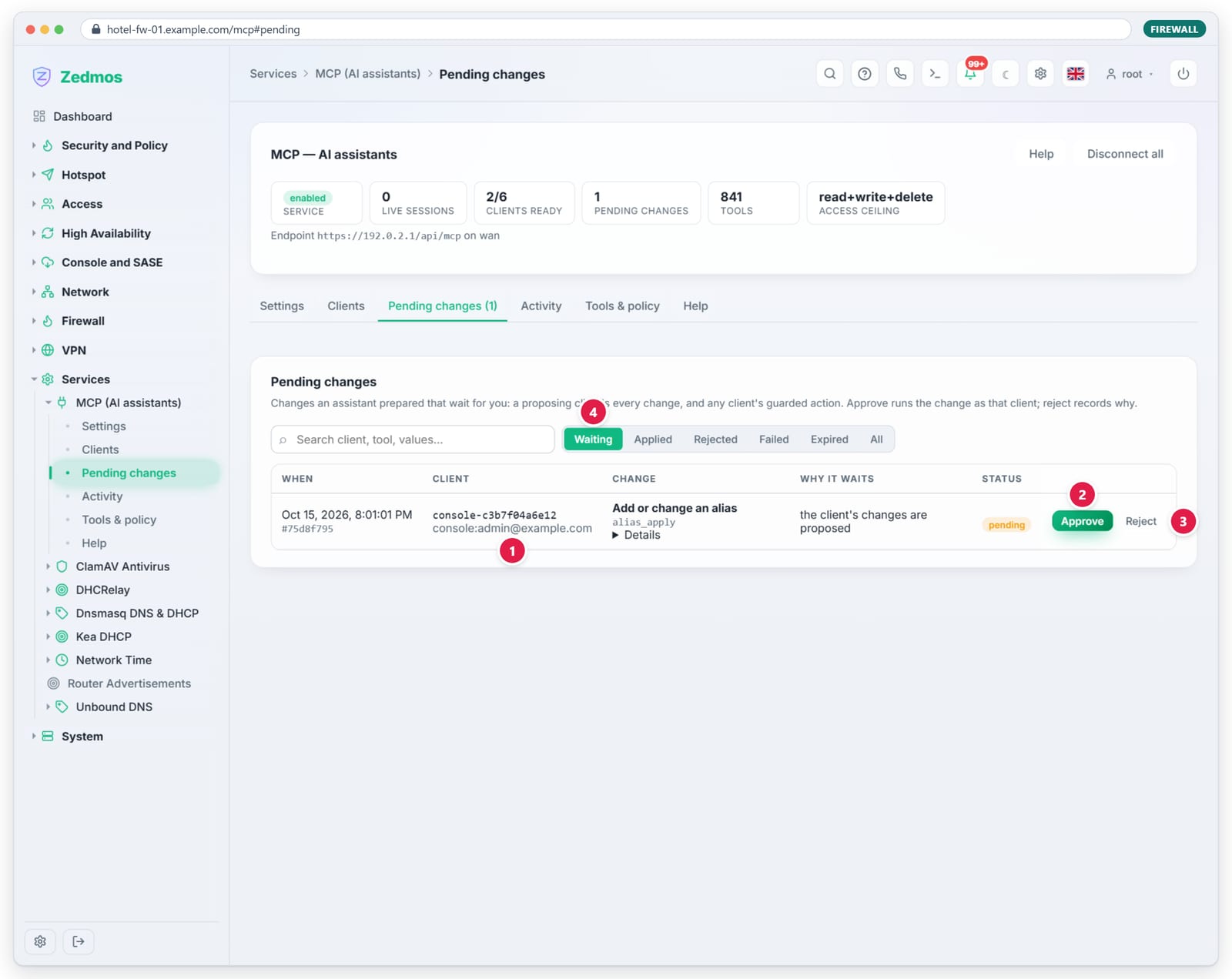
- Client — which client proposed it; for a console connection the
line below names the person (
console:<e-mail>). - Approve — runs the change as that client, now.
- Reject — nothing changes; the reason you give is kept and the assistant can read it.
- Waiting / Applied / Rejected / Failed / Expired / All — filters.
Details under the change shows exactly what it would do. The console shows the same queue (chapter 10).
5.4 Activity
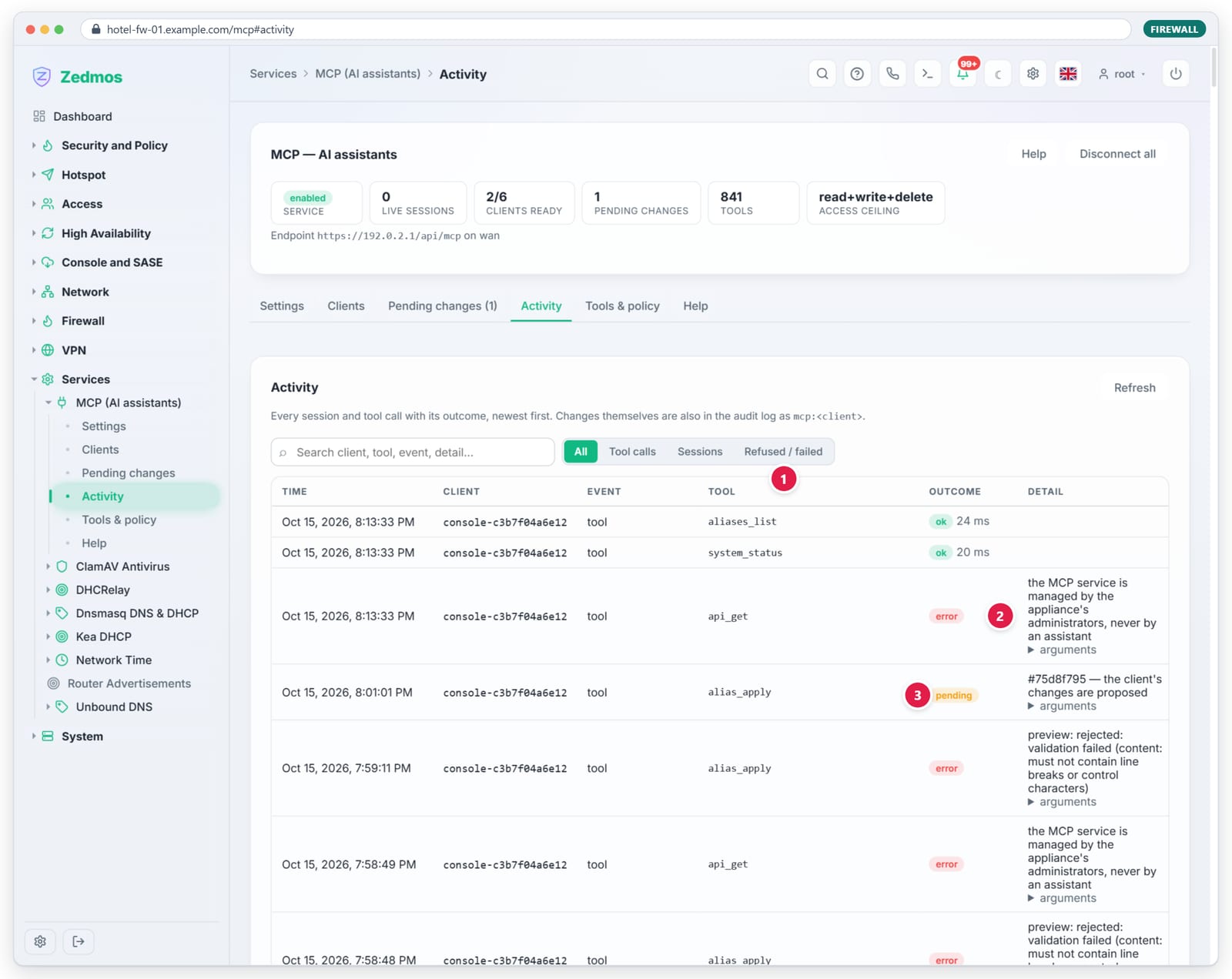
- Refused / failed — shows only what did not succeed.
- A refusal names its reason — here an assistant tried to read the MCP service itself, which no assistant may do.
- pending — the call proposed a change; the detail gives its id.
arguments under a row opens what the assistant sent. Changes that were
applied are also in the firewall's audit log as mcp:<client>.
5.5 Tools & policy
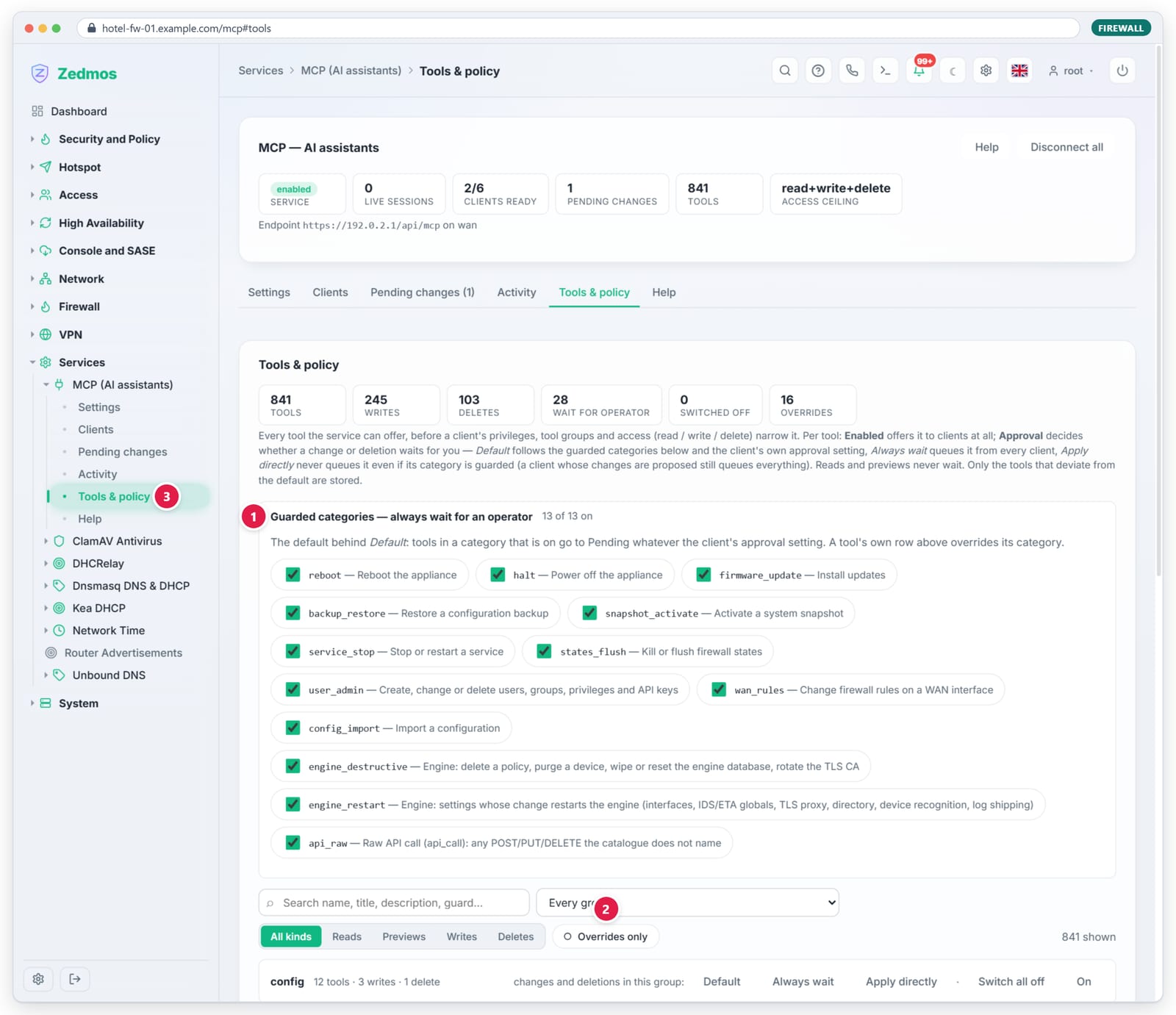
- Guarded categories — kinds of action that always wait for a person (reboot, power off, firmware update, configuration restore, snapshots, stopping services, flushing states, user administration, WAN rules, configuration import, destructive engine actions, engine restarts, raw API calls). All are on by default.
- Overrides only — shows only the tools whose setting differs from the default. Below, every tool is listed, searchable and filterable by kind, with Enabled (offered at all) and Approval — Default (follows the guarded categories and the client's setting), Always wait, or Apply directly.
- The tab is in the menu, so a policy question is one click away.
5.6 Help
The firewall's Help tab explains, per assistant, where its connection file goes. It applies to direct clients.
06
Turn MCP on from the console
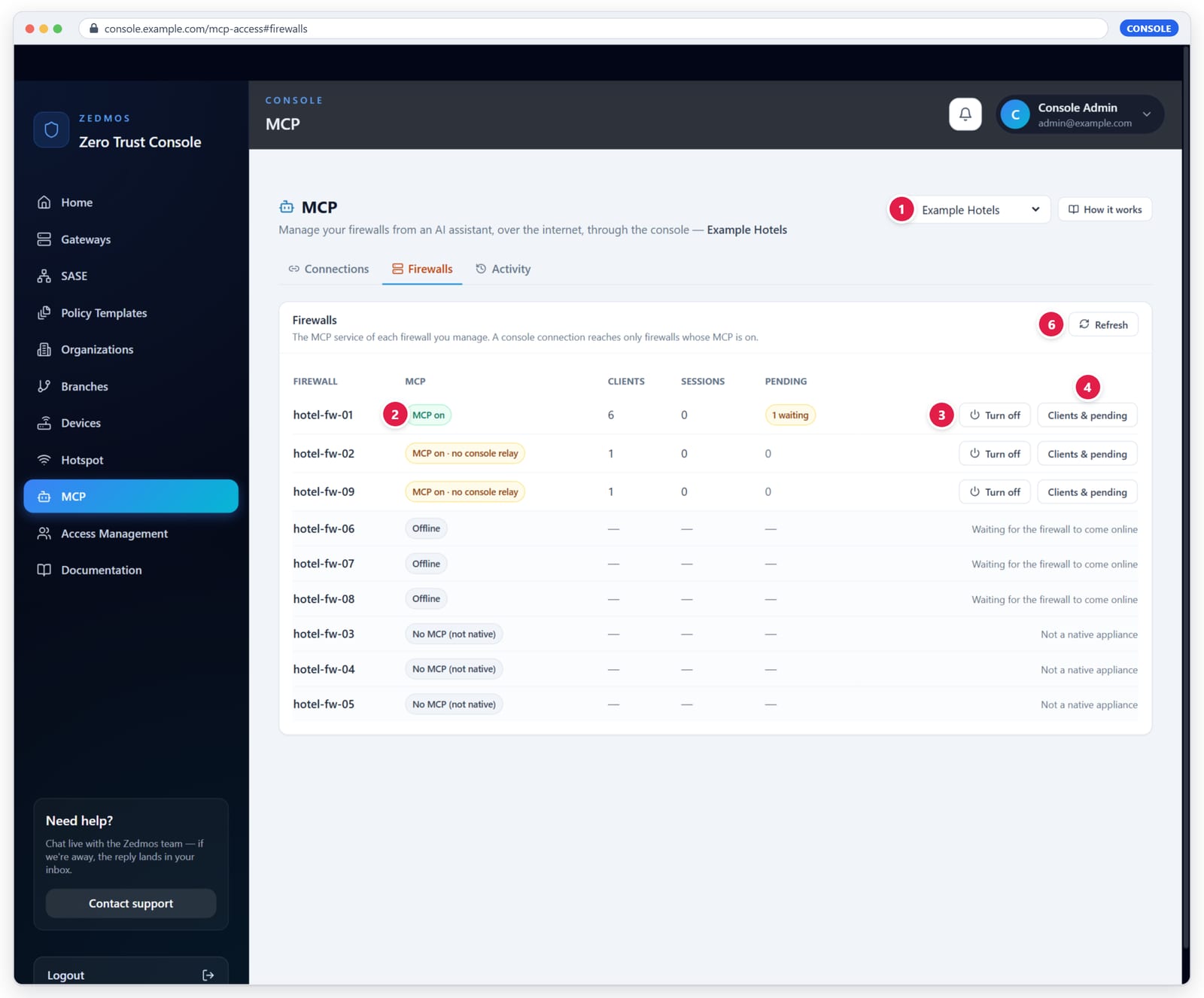
Procedure
- Open MCP and choose the organization at the top (1), or All organizations.
- Open the Firewalls tab.
- For each firewall that should be reachable, press Turn on. A firewall whose MCP is on shows MCP on (2) and Turn off (3).
Firewalls that can act come first. One that cannot says why instead of offering a button:
| State | Meaning |
|---|---|
| MCP on | Ready: it can be chosen for a connection. |
| MCP on · no console relay | MCP runs, but the firmware is older than the console relay. Update the firmware. |
| MCP off | Press Turn on. |
| Firmware too old | The firewall has no MCP service yet. Update the firmware. |
| Offline | The firewall's link to the console is down. |
| No MCP (not native) | Not a Zedmos appliance with MCP. |
Clients & pending (4) opens the firewall's clients and its waiting changes. Refresh (6) reads every firewall again.
6.1 A firewall's clients and pending changes
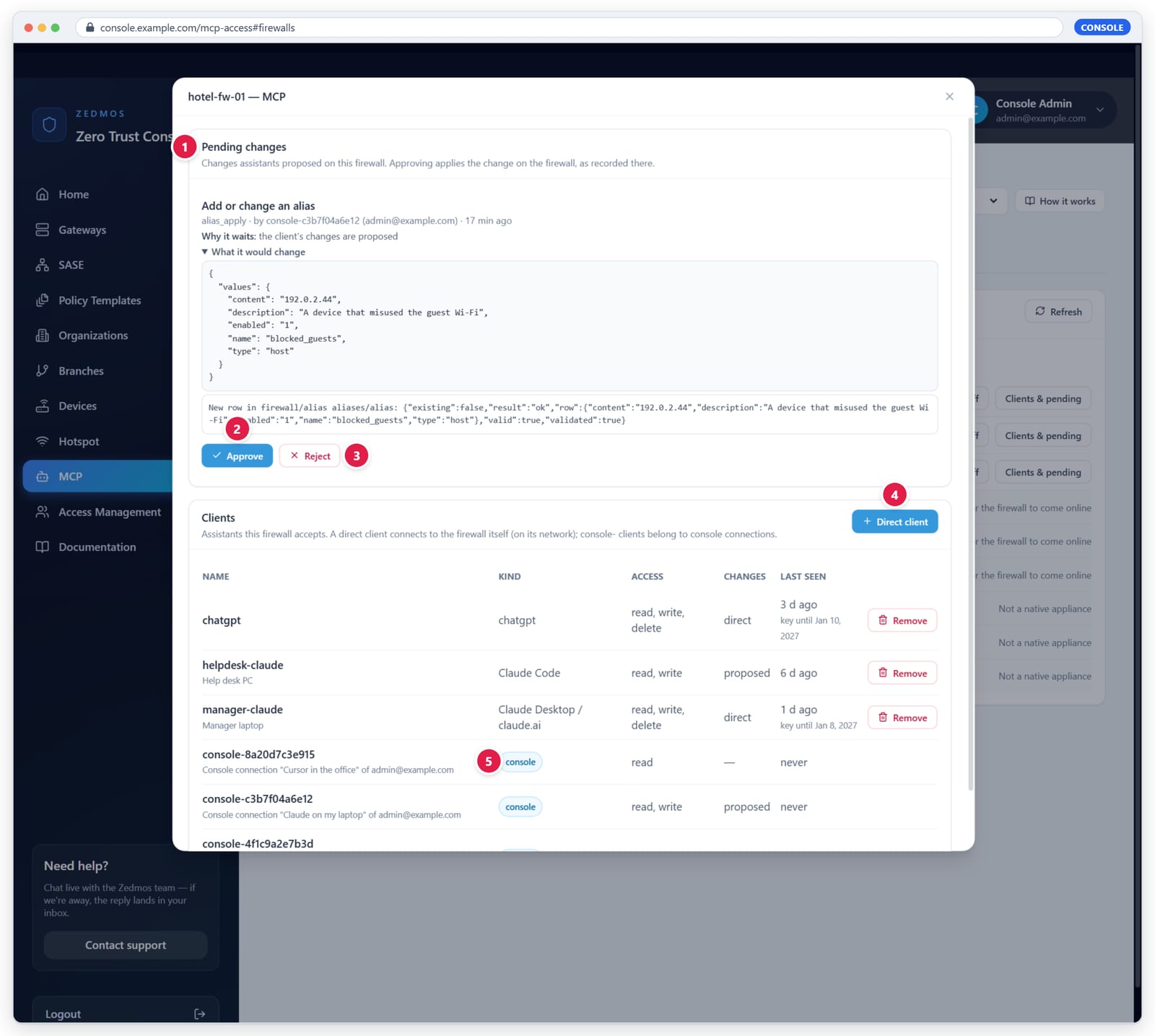
- Pending changes — what assistants proposed on this firewall, with Why it waits and What it would change.
- Approve and 3. Reject — as on the firewall.
- Direct client — a client for an assistant on the firewall's own network (6.2).
- console — a client that belongs to a console connection. It cannot be removed here; revoke the connection instead.
6.2 A direct client from the console
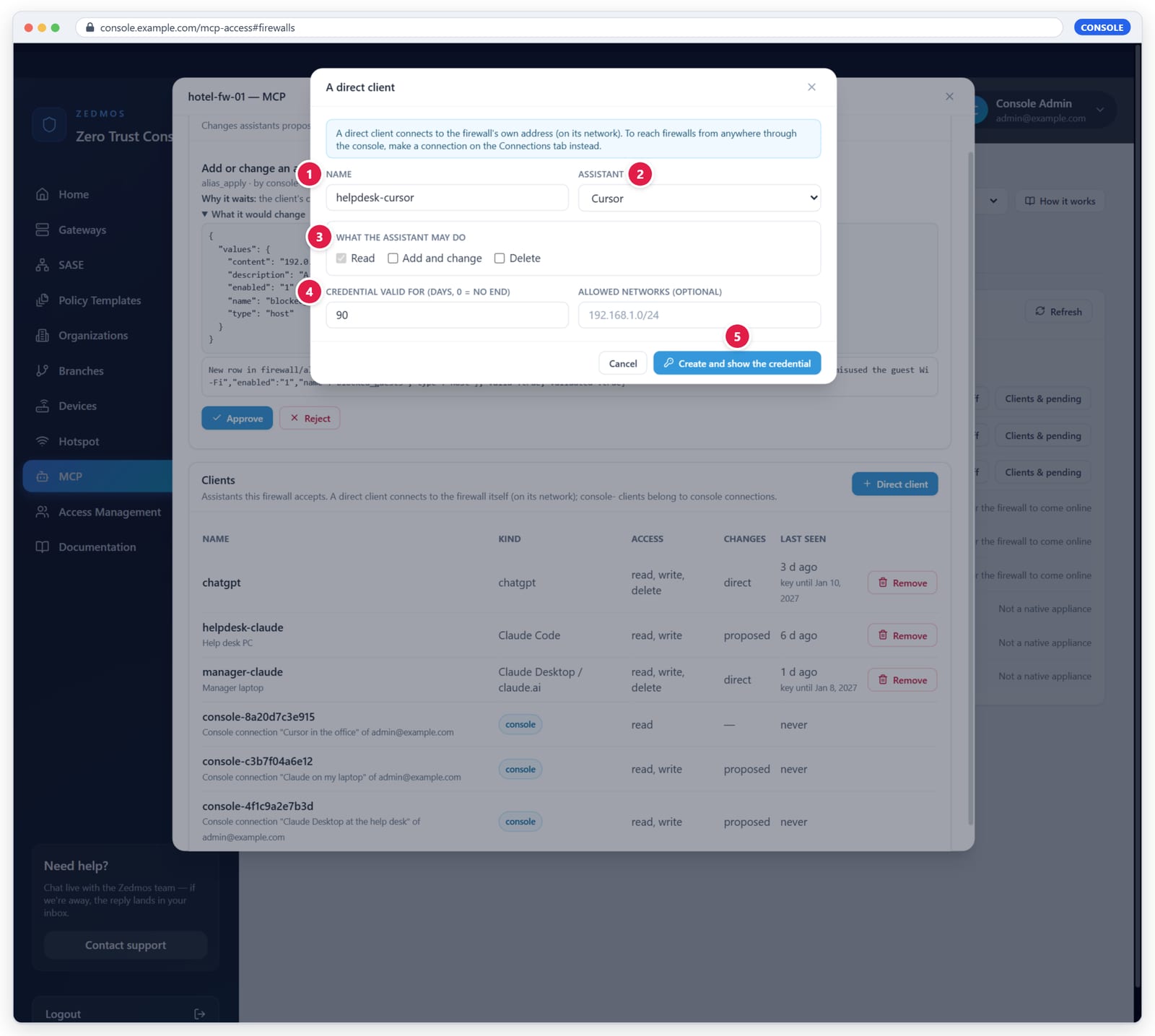
- Name — letters, digits, dot, dash, underscore. Names that start
with
console-are the console's own. - Assistant — decides the shape of the connection file.
- What the assistant may do — Read always; Add and change; Delete; and for each, proposed or direct.
- Credential valid for — days, 0 = no end; and optional Allowed networks.
- Create and show the credential — the credential and the connection file are shown once. The console keeps neither.
Use a direct client for an assistant that runs on the firewall's network. For anything else, use a connection.
07
Make a connection
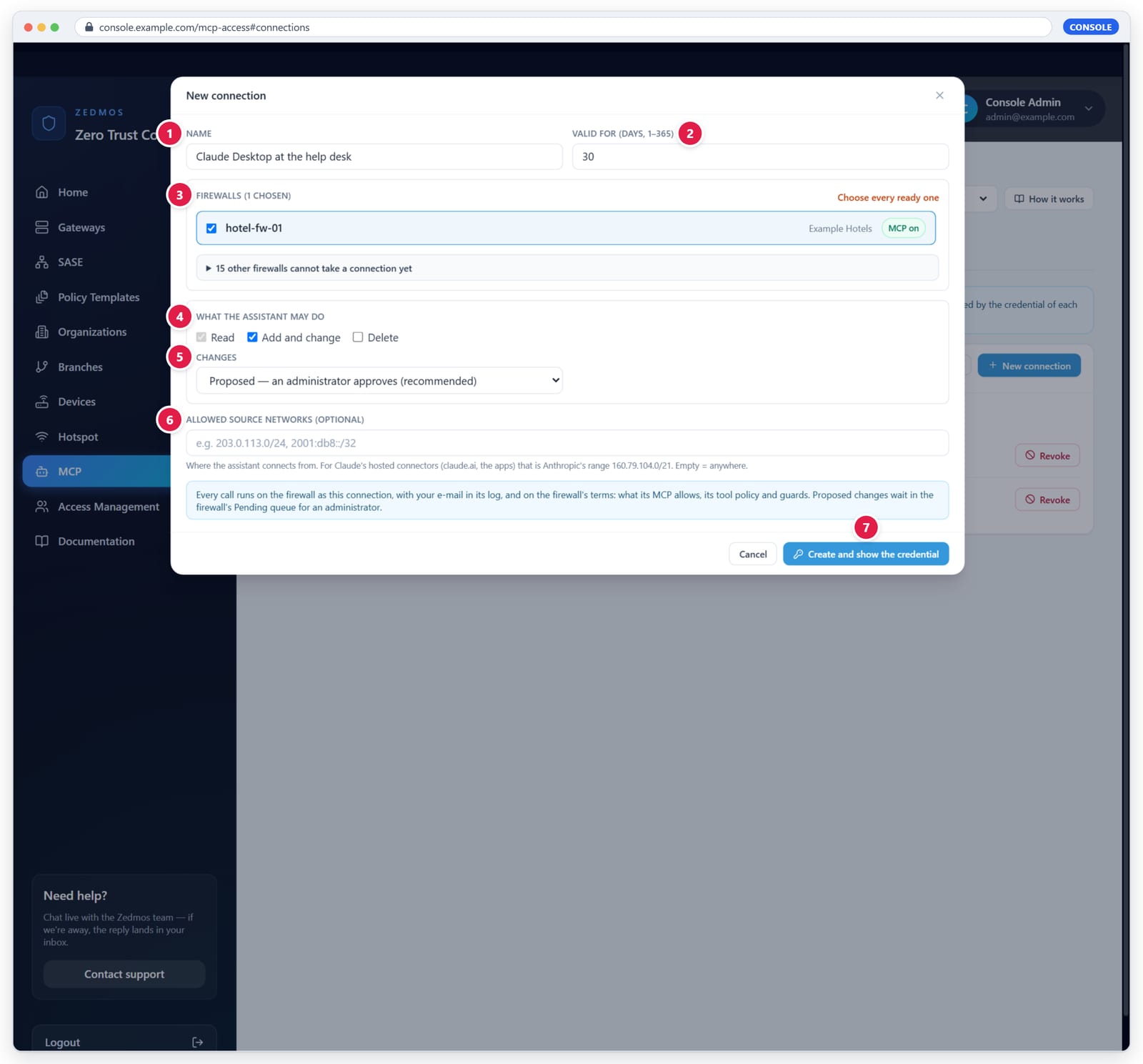
Procedure
- Open MCP › Connections and press New connection.
- Name (1) — what you will recognise later, for example Claude on my laptop.
- Valid for (2) — 1 to 365 days; 30 by default. An expired connection stops working; make a new one.
- Firewalls (3) — tick the firewalls this assistant may reach. Only firewalls whose MCP is on and new enough are offered; the others are listed, folded, with the reason each cannot take a connection yet. Choose every ready one ticks them all.
- What the assistant may do (4) — Read is always on. Tick Add and change and Delete only if the assistant should prepare changes.
- Changes / Deletions (5) — Proposed — an administrator approves (recommended) or Applied directly.
- Allowed source networks (6) — optional. Where the assistant
connects from, as addresses or CIDR ranges. For claude.ai and the Claude
apps that is Anthropic's range
160.79.104.0/21. Empty = anywhere. - Press Create and show the credential (7).
All firewalls are prepared at once, or none: if one of them cannot take the connection, nothing is created and the console says which firewall and why.
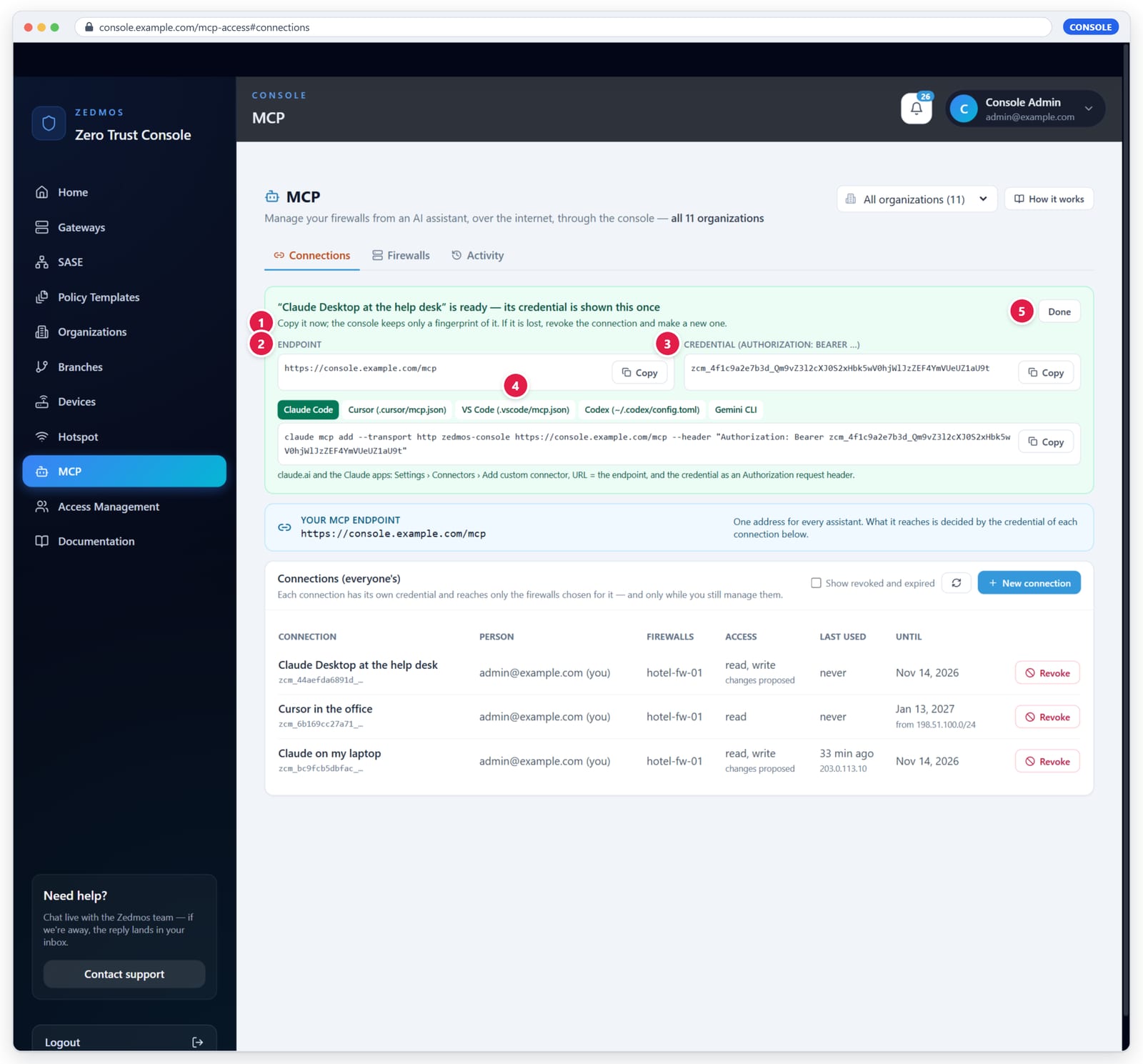
- The credential is shown this once. Copy it now; the console keeps only its fingerprint. If it is lost, revoke the connection and make a new one.
- Endpoint — the same for all your connections.
- Credential — goes into the assistant as
Authorization: Bearer …. - Ready-made settings per assistant (chapter 8).
- Done hides the credential for good.
The connections list (figure 4.1) shows each connection's firewalls, access, last use and source address, and its end date. Revoke stops it (chapter 12).
08
Connect an assistant
Use the endpoint and the credential from figure 7.2. Replace
zcm_… with your credential.
Claude Code
claude mcp add --transport http zedmos-console https://console.example.com/mcp --header "Authorization: Bearer zcm_…"
Cursor (.cursor/mcp.json)
{
  "mcpServers": {
    "zedmos-console": {
      "type": "http",
      "url": "https://console.example.com/mcp",
      "headers": { "Authorization": "Bearer zcm_…" }
    }
  }
}
VS Code (.vscode/mcp.json)
{
  "servers": {
    "zedmos-console": {
      "type": "http",
      "url": "https://console.example.com/mcp",
      "headers": { "Authorization": "Bearer zcm_…" }
    }
  }
}
Codex (~/.codex/config.toml)
[mcp_servers.zedmos_console]
url = "https://console.example.com/mcp"
http_headers = { "Authorization" = "Bearer zcm_…" }
Gemini CLI
gemini mcp add --transport http --header "Authorization: Bearer zcm_…" zedmos-console https://console.example.com/mcp
claude.ai, Claude Desktop and the Claude mobile apps — Settings › Connectors › Add custom
connector: the endpoint as URL, and under request headers
Authorization = Bearer zcm_…. The request-headers section appears only
where your organization has it enabled. Calls come from 160.79.104.0/21;
setting that as the connection's allowed network keeps the credential
useless anywhere else.
Cline needs "type": "streamableHttp"; Windsurf uses serverUrl
and headers. Keep the credential out of shared repositories: where an
assistant supports environment variables in its configuration, use one.
09
Working with an assistant
Once connected, the assistant sees:
- every tool the connection's firewalls offer, each with a required
gatewayargument — the firewall's name as the console shows it; console_gateways— the firewalls of the connection, whether each is online, and whether its MCP is on.
Good first requests:
- "Which firewalls can you reach?" — the assistant calls
console_gateways. - "Is hotel-fw-01 healthy? Show its interfaces and the last firewall log entries." — read tools on one firewall.
- "Block 192.0.2.44 on hotel-fw-01 with an alias." — with changes proposed, this comes back as pending with an id (chapter 10).
The assistant runs one firewall at a time and says which firewall a result came from. A tool that exists only on some firewalls says so in its description. Results that contain text from the network (host names, log lines) are marked untrusted; the assistant treats them as data.
10
Approving changes
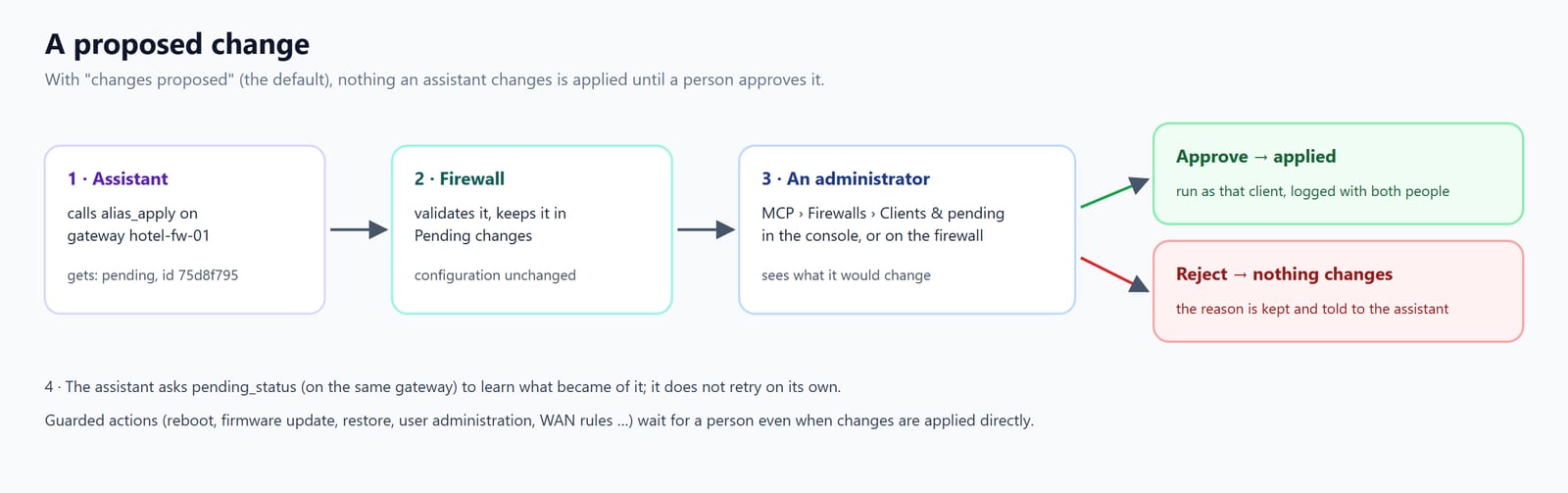
A proposed change is validated by the firewall and kept in its Pending changes; the configuration is unchanged. The assistant receives pending with an id, tells you, and does not retry.
To decide
- In the console: MCP › Firewalls › Clients & pending on that firewall (figure 6.2), or
- on the firewall: Services › MCP › Pending changes (figure 5.3).
Approve runs the change as the client that proposed it and records who
approved it. Reject changes nothing; your reason is kept. The assistant
learns the outcome with pending_status on the same gateway.
Guarded actions wait for a person even on a connection whose changes are applied directly. Approving a change that touches the firewall rules is not the same as applying the rules: the assistant (or you) still runs Apply firewall changes where the firewall needs it.
11
Activity and audit
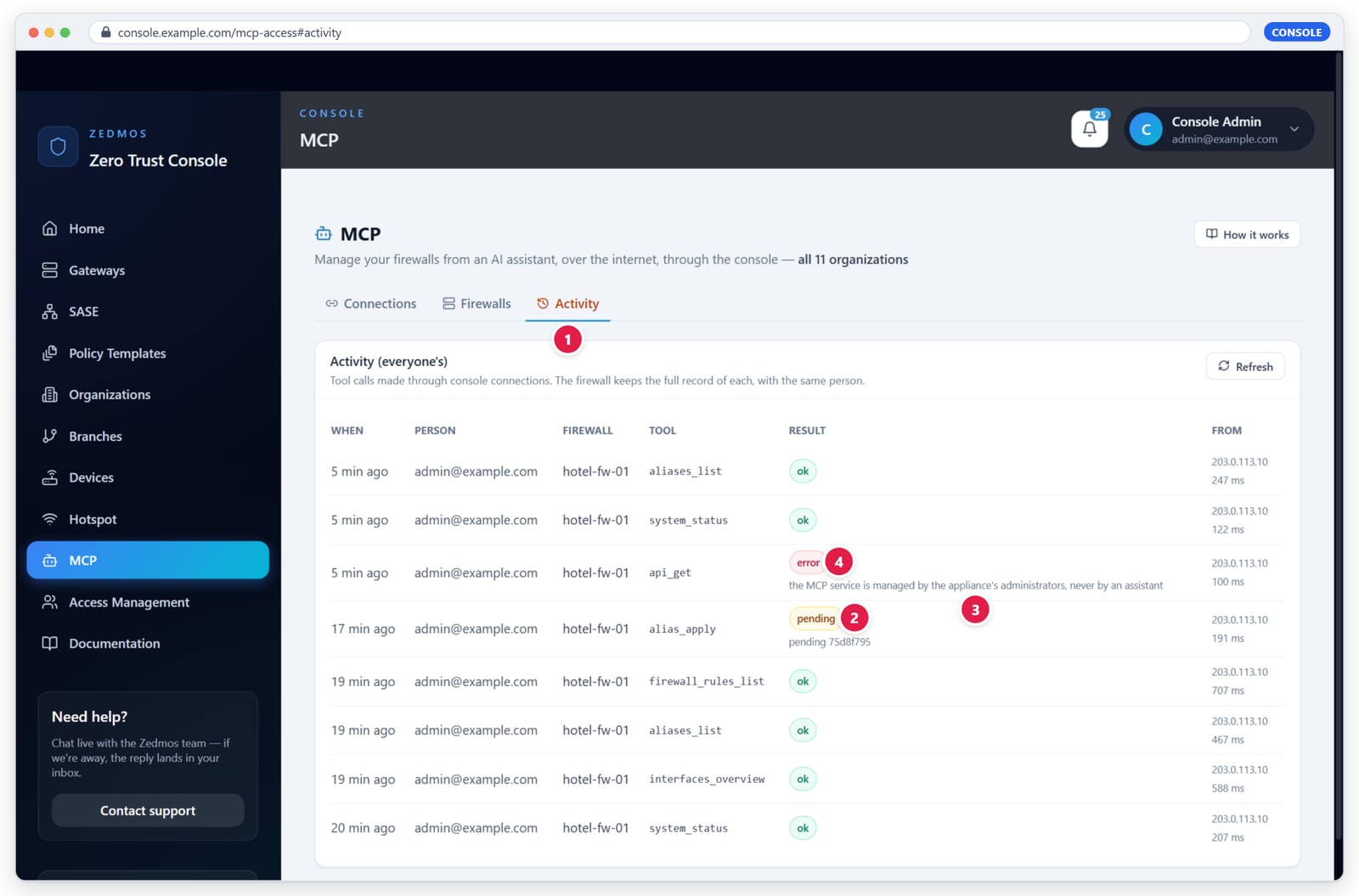
Every call through the console is listed with time, person, firewall, tool, result and source address (kept 90 days):
- Activity tab.
- pending — a change that waits; the detail gives its id.
- A refused call with its reason, as the firewall gave it.
- error — the call ran but the tool answered with an error.
The console owner sees everyone's activity; anyone else sees their own. The console does not keep the conversation itself — only who called what, where, and what came of it. The full record, with the arguments, is on the firewall (figure 5.4).
12
Revoking and switching off
| To stop | Do this | Effect |
|---|---|---|
| One connection | MCP › Connections › Revoke | The credential stops working at once; the connection's client is removed from each firewall. A firewall offline at that moment keeps an unusable client until you delete it there. |
| One person | Take their role away, or suspend the account | Their connections lose the firewalls at the next call; a suspended account's connections stop entirely. |
| One firewall, for every assistant | MCP › Firewalls › Turn off, or on the firewall Enable the MCP service off | Every assistant, direct or through the console, is refused by that firewall. |
| One connection on one firewall | On the firewall, disable or delete its console-<id> client |
That connection keeps working on its other firewalls. |
13
Security model
- No firewall is exposed. Console connections reach a firewall over the link the firewall itself opens to the console. Nothing on the internet can open an MCP connection to a firewall that does not listen on its WAN for direct clients.
- No firewall secret in the console. A console client has no credential; the firewall accepts it only over the console link.
- Credentials are 256-bit, shown once, stored as fingerprints. The console compares them in constant time and counts failed attempts per address.
- Short-lived by design. Connections end after at most a year (30 days by default) and can be limited to source networks.
- Least privilege, checked live. Read only by default; changes proposed by default; the person's role is checked on every call; the firewall's own ceiling, tool policy and guarded categories still apply.
- All or nothing. A connection is created on every chosen firewall or on none.
- Assistants cannot change MCP itself. Its clients, settings and policy are refused to every assistant on every firewall.
- Secrets stay hidden. Console clients never read passwords or keys.
- Recorded twice. Console Activity and the firewall's own log, both with the person's e-mail. The console's command log keeps neither relayed conversations nor issued credentials.
14
Troubleshooting
| What you see | What it means | What to do |
|---|---|---|
401 credential_required / malformed_credential |
The header is missing or the credential is cut. | Paste the whole zcm_… value after Bearer . |
401 unknown_credential |
No such connection (mistyped, or deleted). | Make a new connection. |
401 connection_expired / connection_revoked |
As it says. | Make a new connection. |
401 account_unavailable |
The person's account is suspended or gone. | Restore the account, or make the connection as someone else. |
403 source_not_allowed |
The assistant connects from outside the allowed networks. | Add its network to a new connection. |
403 license_blocked |
The console licence does not allow it. | Renew the licence. |
| 429 | Too many calls or failed attempts in a minute. | Wait a minute. |
| "Unknown or unavailable gateway" | The firewall is not in the connection, you no longer manage it, or it moved to another organization. | Call console_gateways; check your role. |
| "The firewall is offline" | Its link to the console is down. | The other firewalls keep working. |
| A firewall cannot be chosen | MCP off, offline, or firmware too old. | See chapter 6. |
| A change "does not validate" | The firewall refused the values. | Read the reason in Activity; correct the request. |
Appendix A
The /mcp endpoint
| Item | Value |
|---|---|
| Address | https://<console>/mcp |
| Transport | MCP Streamable HTTP, stateless: every request is a POST with one JSON-RPC message (or a batch of up to 20); answers are JSON. GET answers 405 (no event stream). |
| Authentication | Authorization: Bearer zcm_<12 hex>_<43 characters> |
| Protocol versions | 2025-11-25, 2025-06-18, 2025-03-26, 2024-11-05 |
| Methods | initialize, ping, tools/list, tools/call; resources/list, resources/templates/list and prompts/list answer empty lists; notifications are accepted. |
| Console tool | console_gateways |
| Routing argument | gateway (required on every firewall tool) |
Appendix B
Limits and defaults
| Setting | Value |
|---|---|
| Connection lifetime | 1–365 days, default 30 |
| Firewalls per connection | up to 200 |
| Calls per connection | 300 per minute |
| Requests per source address | 600 per minute; 20 refusals per minute |
| One tool call | up to 120 seconds |
| A message to a firewall | up to 1 MB |
| Tool list per firewall | refreshed every 5 minutes |
| Console activity | kept 90 days |
| Default access | Read; changes and deletions proposed |
Appendix C
Glossary
| Term | Meaning |
|---|---|
| MCP | Model Context Protocol: how AI assistants call tools. |
| Assistant | The AI application (Claude, Cursor, …) that calls the tools. |
| Client | On a firewall, one assistant's identity with its access and approval settings. |
| Direct client | A client that connects to the firewall itself, with its own credential and connection file. |
| Console client | A client of the kind Through the console, created for one console connection; no credential. |
| Connection | In the console, one assistant's credential and the firewalls it reaches. |
| Endpoint | The address an assistant calls: https://<console>/mcp. |
| Gateway | The firewall a tool runs on (the gateway argument). |
| Proposed change | A change that waits in the firewall's Pending queue for a person. |
| Guarded category | A kind of action that always waits for a person. |
| Relay | The firewall's internal entry that runs a console client's call, reachable only over the console link. |
Le même manuel en PDF illustré, à imprimer ou à lire hors ligne.