Settings
Interfaces, identity, TLS, storage, SIEM and the console link
Interfaces
Which interfaces the engine protects, and how it sits in the path. This is the first screen to get right — everything else inspects the traffic these settings admit.
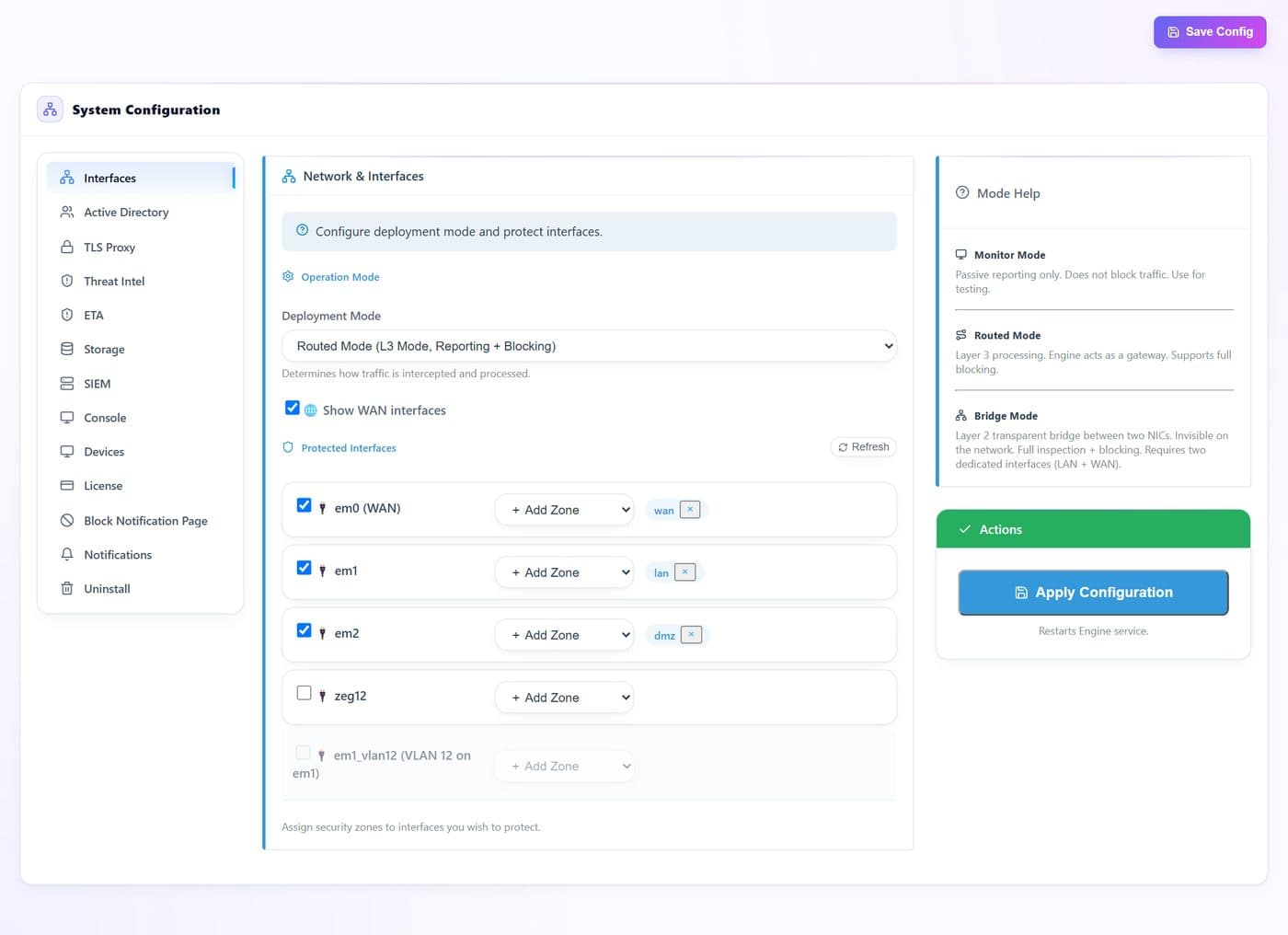
- 1
- 2
- 3
- 4
- 5
- 6
| # | Control | What it does · how · why |
|---|---|---|
| 1 | Deployment Modeselect | Monitor reports only and never blocks — use it to observe before enforcing. Routed makes the engine a layer-3 gateway with full blocking. Bridge is a transparent layer-2 bridge between two NICs, invisible on the network, and needs two dedicated interfaces. |
| 2 | Show WAN interfacestoggle | Includes WAN-facing NICs in the list below. Off hides them so you cannot arm the internet side by accident. |
| 3 | Refreshbutton | Re-reads the live interface list from the system — use it after adding a NIC or a VLAN. |
| 4 | Protected interfacetoggle | Arms the engine on that interface. Unchecked interfaces are passed through untouched. |
| 5 | Security zoneselect | Names the side an interface sits on — wan, lan, dmz. Policy selectors match on these zone names, so a consistent naming scheme here pays off across every group. |
| 6 | Apply Configurationbutton | Writes the interface set and restarts the engine so it attaches to the new list. |
Active Directory
Ties network traffic to real user names. Without it, policies can only target addresses and devices; with it, selectors like users and groups start matching.
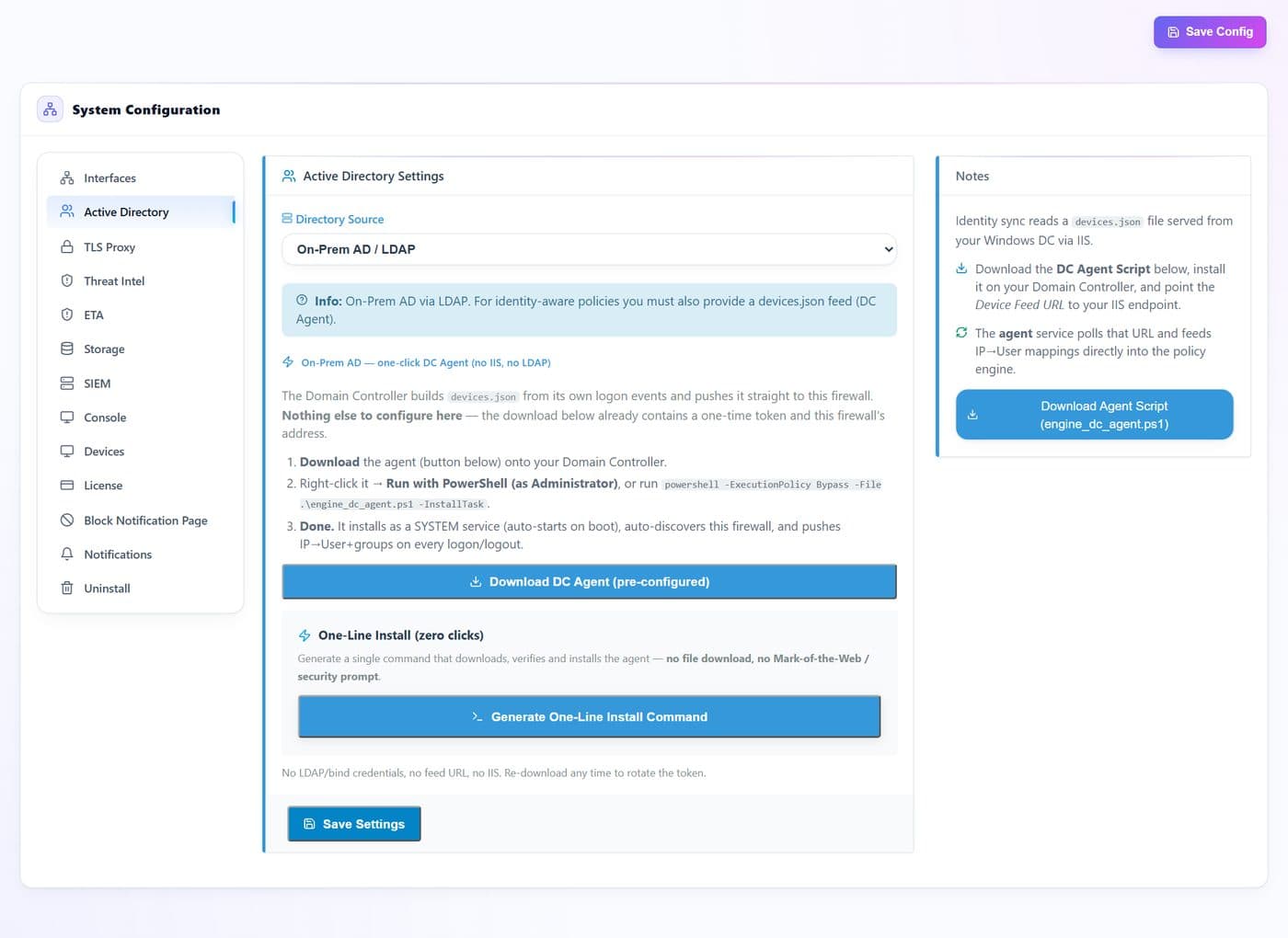
- 1
- 2
- 3
- 4
- 5
| # | Control | What it does · how · why |
|---|---|---|
| 1 | Directory typeselect | On-prem AD/LDAP or a cloud directory. The choice decides which fields and which agent you need. |
| 2 | Download DC Agentbutton | A pre-configured agent for your domain controller — it already carries this appliance's address and credentials. |
| 3 | One-line install commandbutton | Copy-paste installer for the domain controller, for when downloading a file is inconvenient. |
| 4 | Agent scriptbutton | The raw PowerShell agent, if your change process needs to review it before it runs. |
| 5 | Save Settingsbutton | Stores the directory configuration. Identity mapping starts as soon as the agent reports in. |
TLS Proxy
The certificate authority and listeners that make HTTPS inspection possible. Every deep-inspection feature — URL filtering, DLP, file scanning inside TLS — depends on what you configure here.
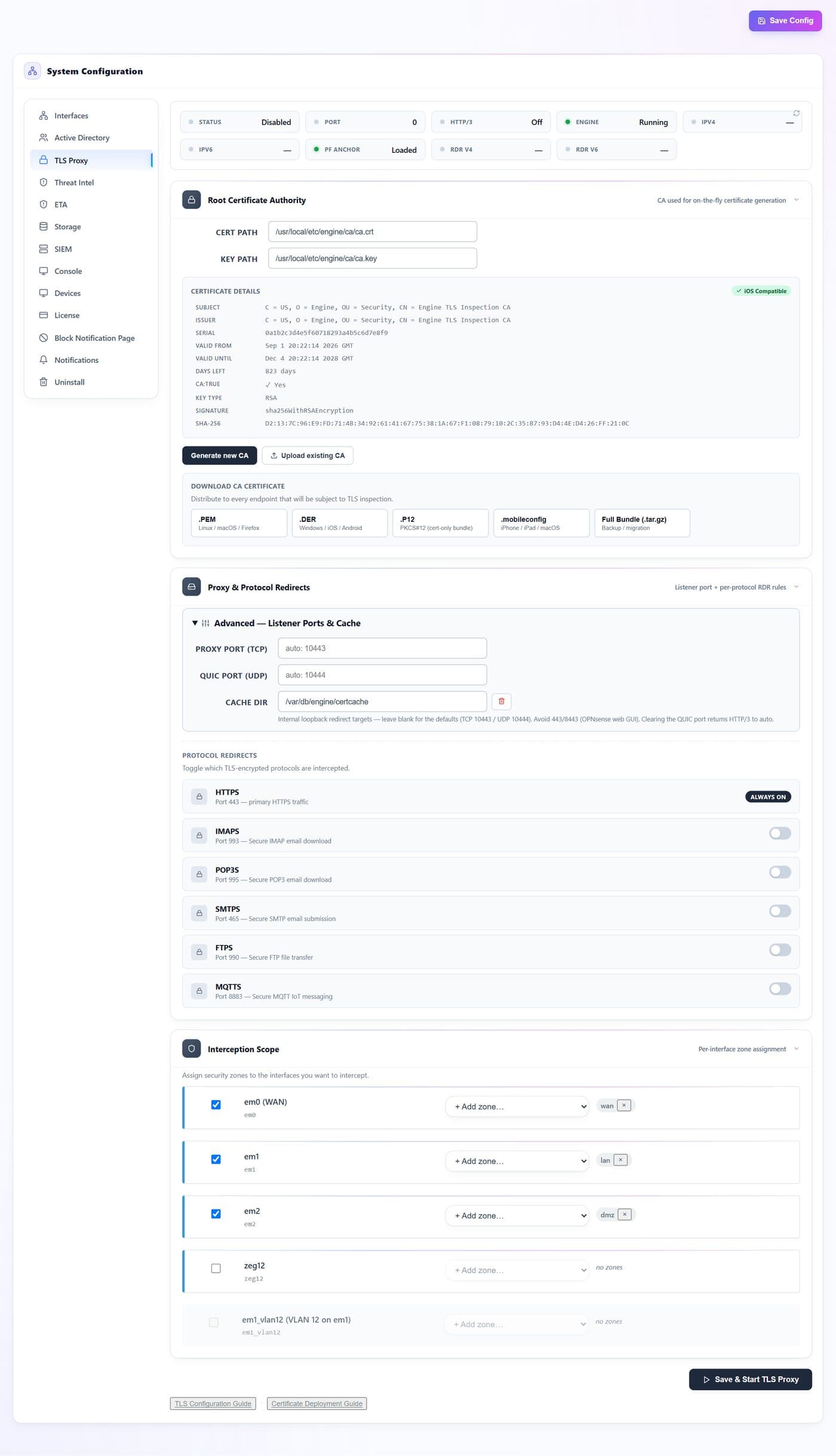
- 1
- 2
- 3
- 4
- 5
- 6
- 7
- 8
| # | Control | What it does · how · why |
|---|---|---|
| 1 | Generate new CAbutton | Creates a fresh root certificate authority on the appliance. Doing this invalidates the trust you have already deployed, so plan a redistribution. |
| 2 | Upload existing CAbutton | Use a CA your organisation already controls — clients that trust it need no new deployment. |
| 3 | CA download formatsbutton | One file per platform: PEM for Linux, macOS and Firefox; DER for Windows, iOS and Android; PKCS#12; a mobileconfig profile for Apple devices; and a full bundle for backup or migration. |
| 4 | Proxy portsnum | The ports the interception listeners bind. Leave them on auto unless something else on the box already owns those ports. |
| 5 | Certificate cachetext | Where generated leaf certificates are cached, so a repeat visit does not pay the signing cost again. |
| 6 | Interception scopetoggle | Which zones are inspected. Start narrow — one lab zone — and widen once the CA is trusted everywhere. |
| 7 | Save & Start TLS Proxybutton | Applies the settings and brings the listeners up. |
| 8 | Guidesbutton | Step-by-step help for configuring interception and for pushing the CA to clients. |
Threat Intel
The feeds behind the Security tab of a policy. Each feed is a list of malicious domains or addresses that the engine refreshes on a schedule.
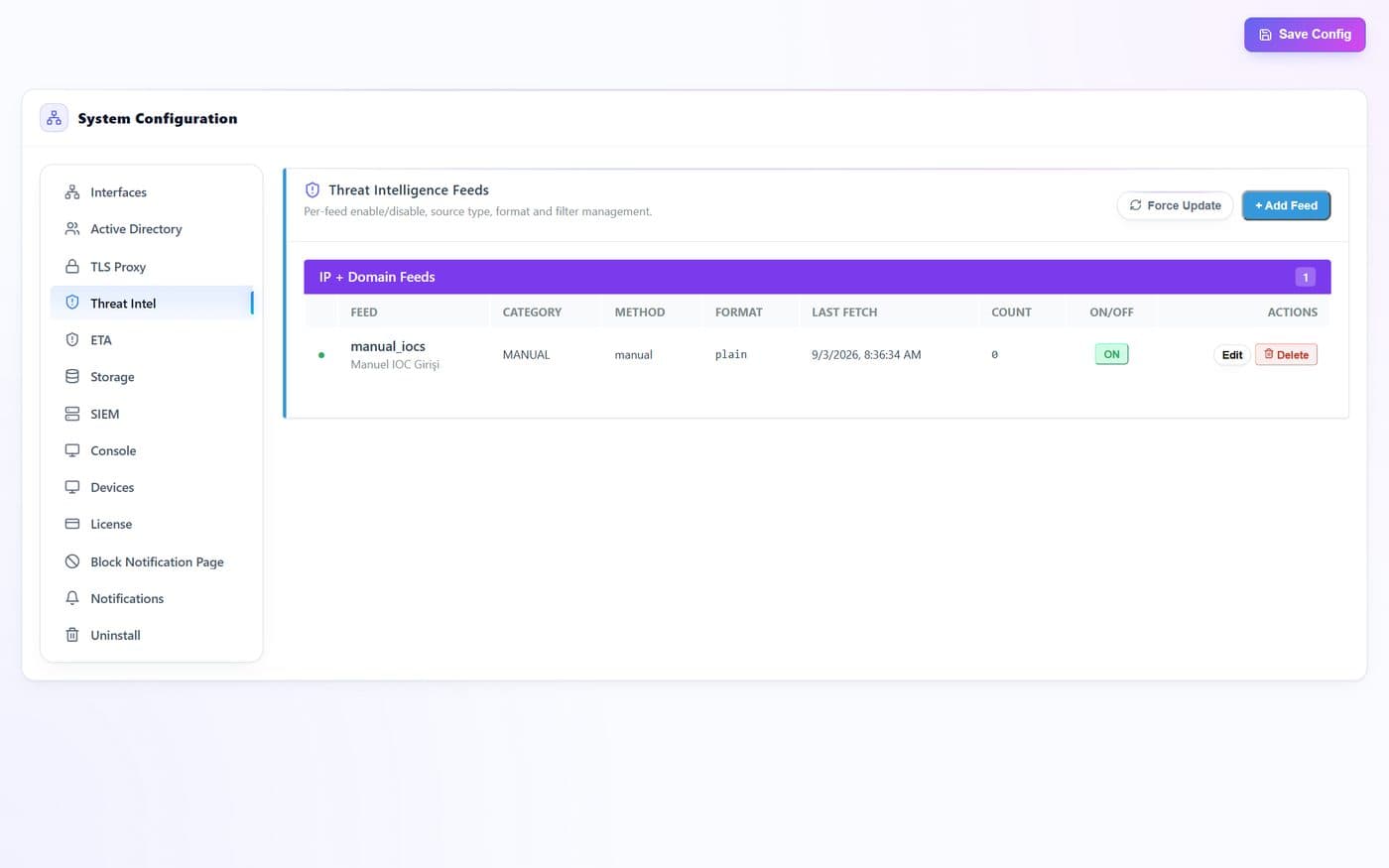
- 1
- 2
- 3
- 4
- 5
| # | Control | What it does · how · why |
|---|---|---|
| 1 | Force Updatebutton | Pulls every enabled feed immediately instead of waiting for the next scheduled refresh — useful right after adding one. |
| 2 | Add Feedbutton | Register a custom feed by URL and format. Your own indicator lists live here alongside the built-in ones. |
| 3 | Feed switchbutton | Enables or disables a single feed without deleting it — the fastest way to test whether a feed causes a false positive. |
| 4 | Editbutton | Change a feed's URL, format or refresh interval. |
| 5 | Deletebutton | Removes the feed and its downloaded indicators. |
ETA
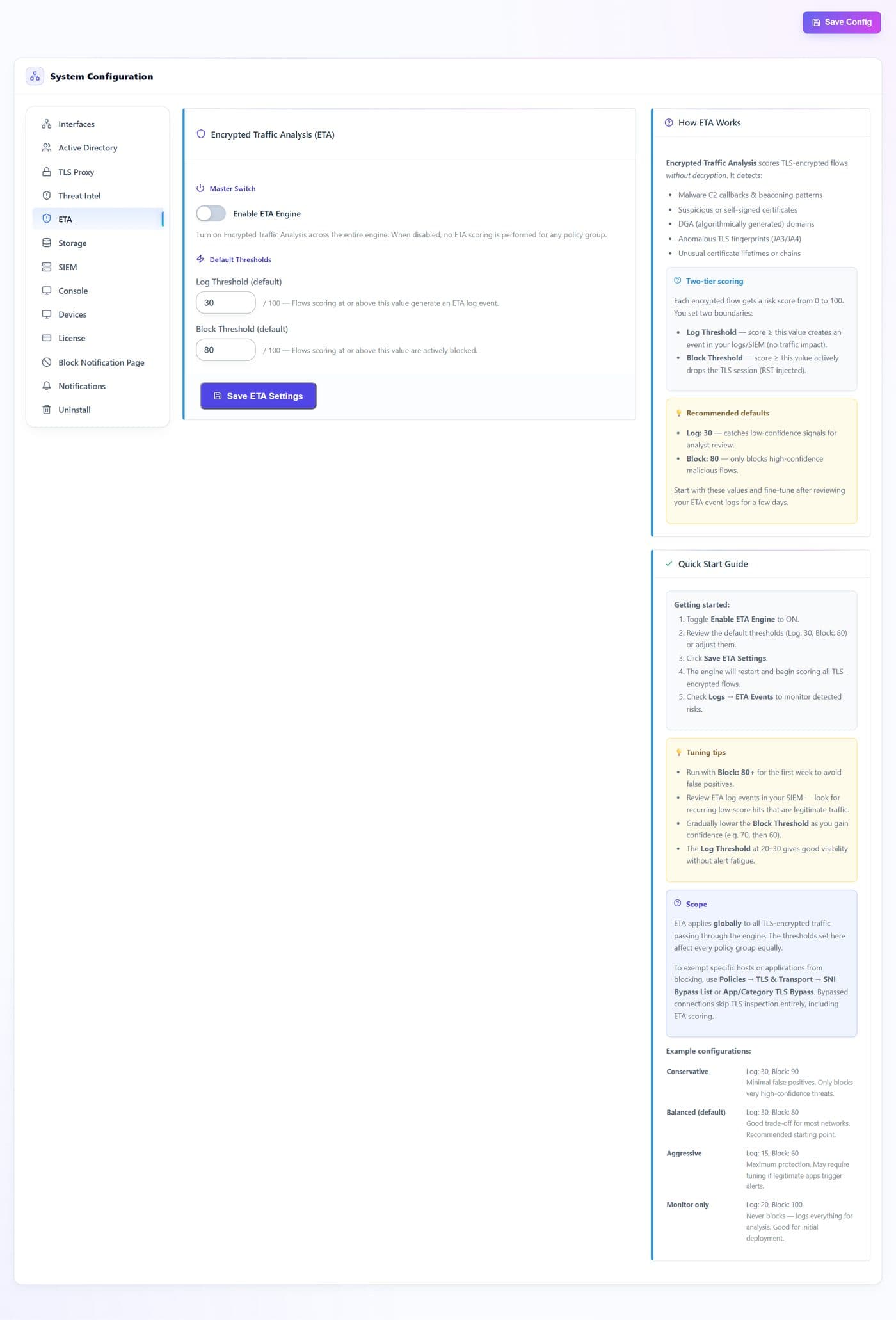
Encrypted Traffic Analysis scores connections that cannot be decrypted — pinned apps, bypassed sites — using their shape rather than their content.
- 1
- 2
- 3
| # | Control | What it does · how · why |
|---|---|---|
| 1 | Log thresholdnum | Score above which a connection is recorded for review. Lower means more visibility and more noise. |
| 2 | Block thresholdnum | Score above which a connection is dropped. Raise it if legitimate traffic is being caught. |
| 3 | Save ETA Settingsbutton | Applies both thresholds. They also exist per policy group, where a group can override this default. |
Storage
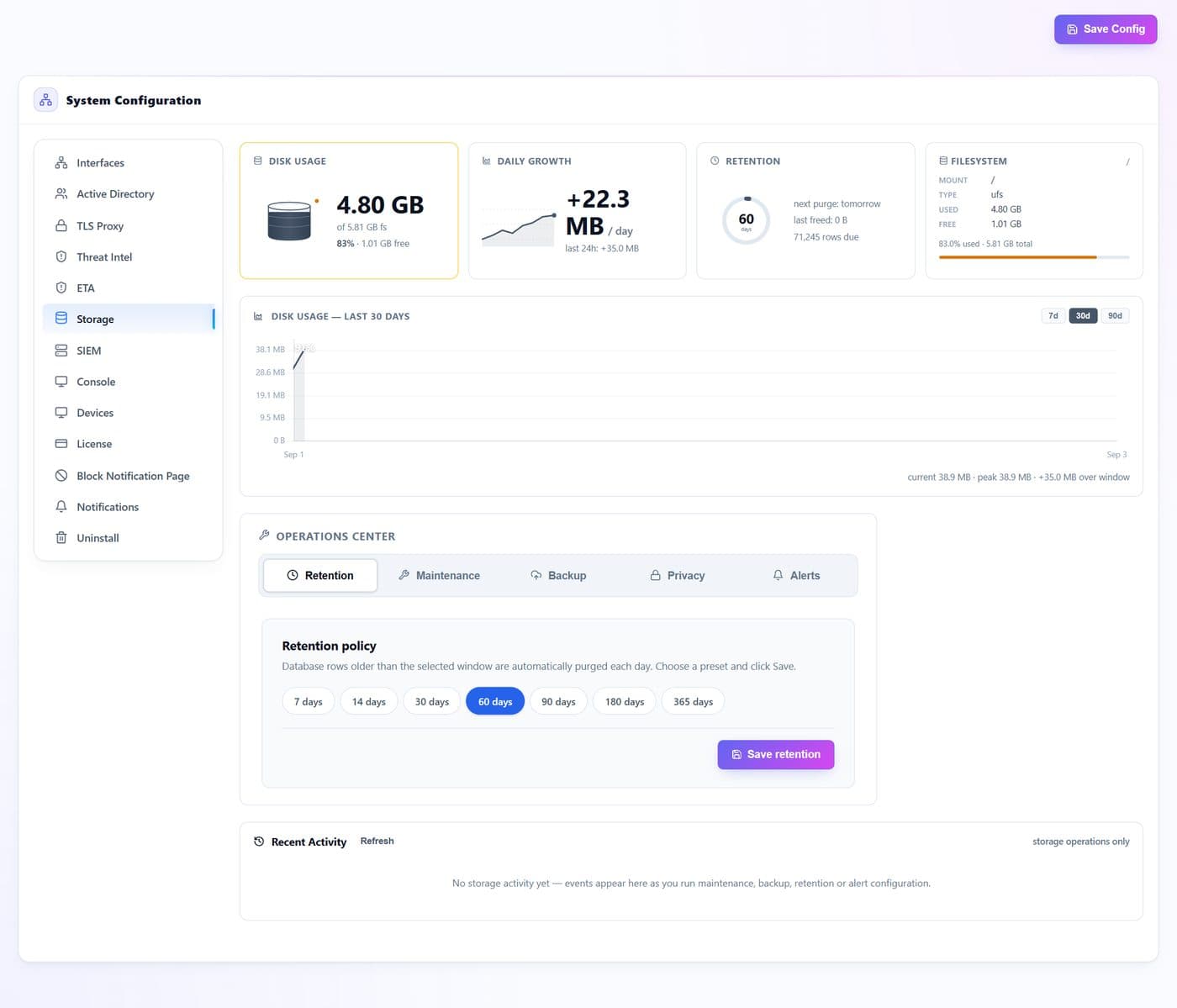
How long the appliance keeps what it records, and the housekeeping that keeps the database healthy. An appliance that never prunes eventually fills its disk and stops recording.
- 1
- 2
- 3
- 4
- 5
- 6
- 7
| # | Control | What it does · how · why |
|---|---|---|
| 1 | Retention presetsbutton | Common windows — 7, 30 or 90 days. The Retention panel below sets per-table detail if you need finer control. |
| 2 | Retentionbutton | Per-data-type retention: flows, DNS, threats and audit records can each keep a different history. |
| 3 | Maintenancebutton | Compaction and integrity tasks that reclaim space and keep queries fast. |
| 4 | Backupbutton | Export and restore of the appliance database. |
| 5 | Privacybutton | Redaction and anonymisation options for what is written to disk. |
| 6 | Alertsbutton | Warn before the disk fills, rather than after recording has already stopped. |
| 7 | Save retentionbutton | Applies the retention window. |
SIEM
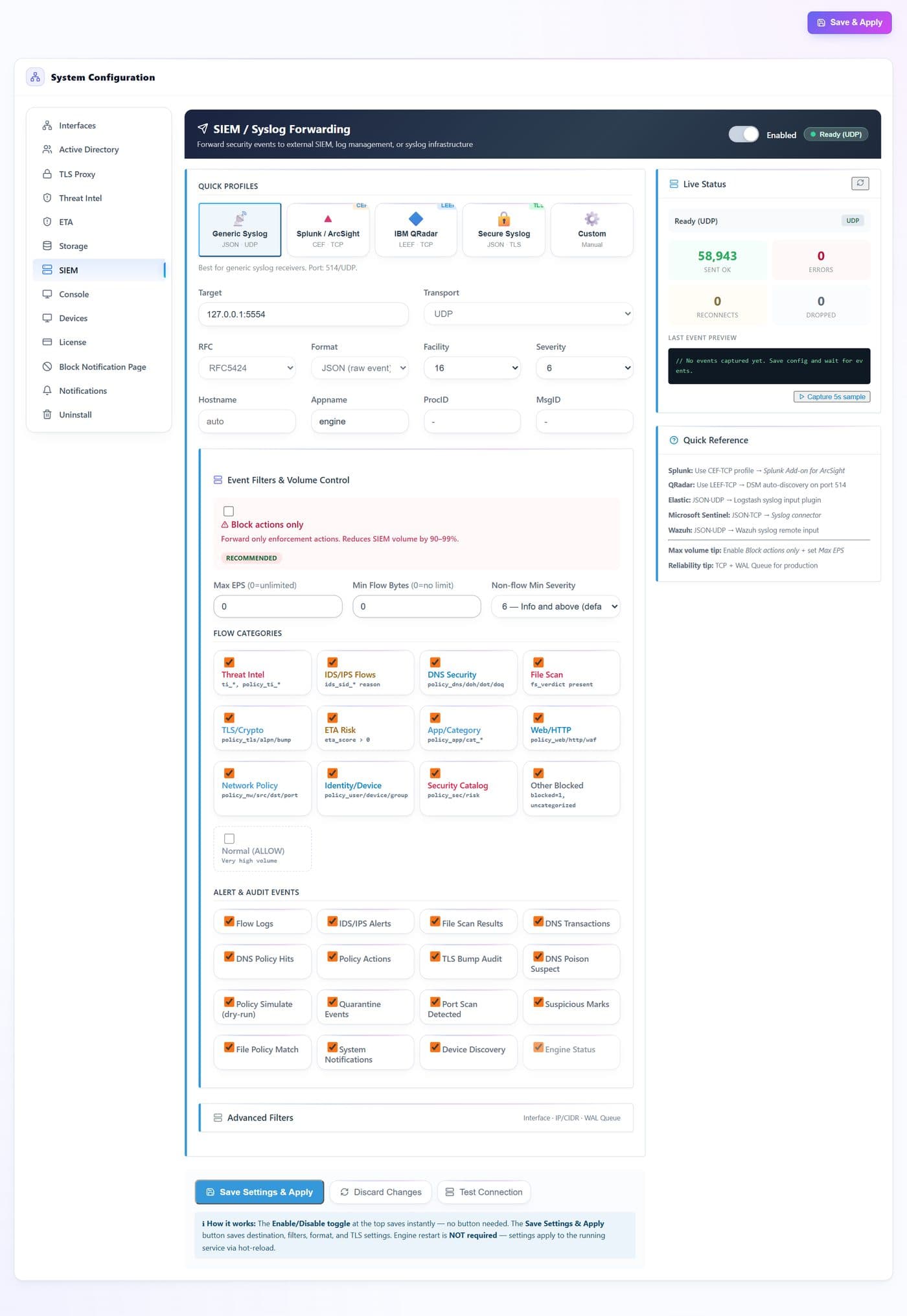
Forwards security events to an external SIEM or syslog collector. A quick profile sets the transport, framing and format for the common products in one click; everything below it is there when your collector is unusual.
- 1
- 2
- 3
- 4
- 5
- 6
- 7
- 8
- 9
- 10
| # | Control | What it does · how · why |
|---|---|---|
| 1 | Quick profilesbutton | One click sets transport, framing and format: Generic Syslog (JSON over UDP), Splunk/ArcSight (CEF over TCP), IBM QRadar (LEEF over TCP), Secure Syslog (JSON over TLS), or Custom for anything else. |
| 2 | Targettext | Host and port of the collector, for example siem.example.com:514. |
| 3 | Transportselect | UDP is fire-and-forget; TCP gives delivery feedback and is what you want in production; TLS adds encryption for anything crossing an untrusted network. |
| 4 | RFC · Format · Facility · Severityselect | The syslog framing and the payload shape. The quick profile fills these in; change them only to match a collector that disagrees. |
| 5 | Identity fieldstext | Hostname, appname, process and message id as they appear in the syslog header — set them so events from several appliances stay distinguishable. |
| 6 | Block actions onlytoggle | Forward only enforcement actions. The recommended starting point; it is the single biggest volume control on this page. |
| 7 | Max EPS · Min flow bytes · Min severitynum | Hard ceilings that protect the collector: events per second, a floor on flow size, and the lowest severity worth sending. |
| 8 | Flow categoriestoggle | Which classes of flow event are forwarded — threat intel, IDS/IPS, DNS, file scan, TLS, ETA, app/category, web, network, identity, security catalog. Normal (ALLOW) is off by default because it is very high volume. |
| 9 | Test Connectionbutton | Sends a probe to the target so you learn about a firewall or a wrong port here, not during an incident. |
| 10 | Save Settings & Applybutton | Applies destination, filters, format and TLS to the running service. No engine restart is required. |
Console
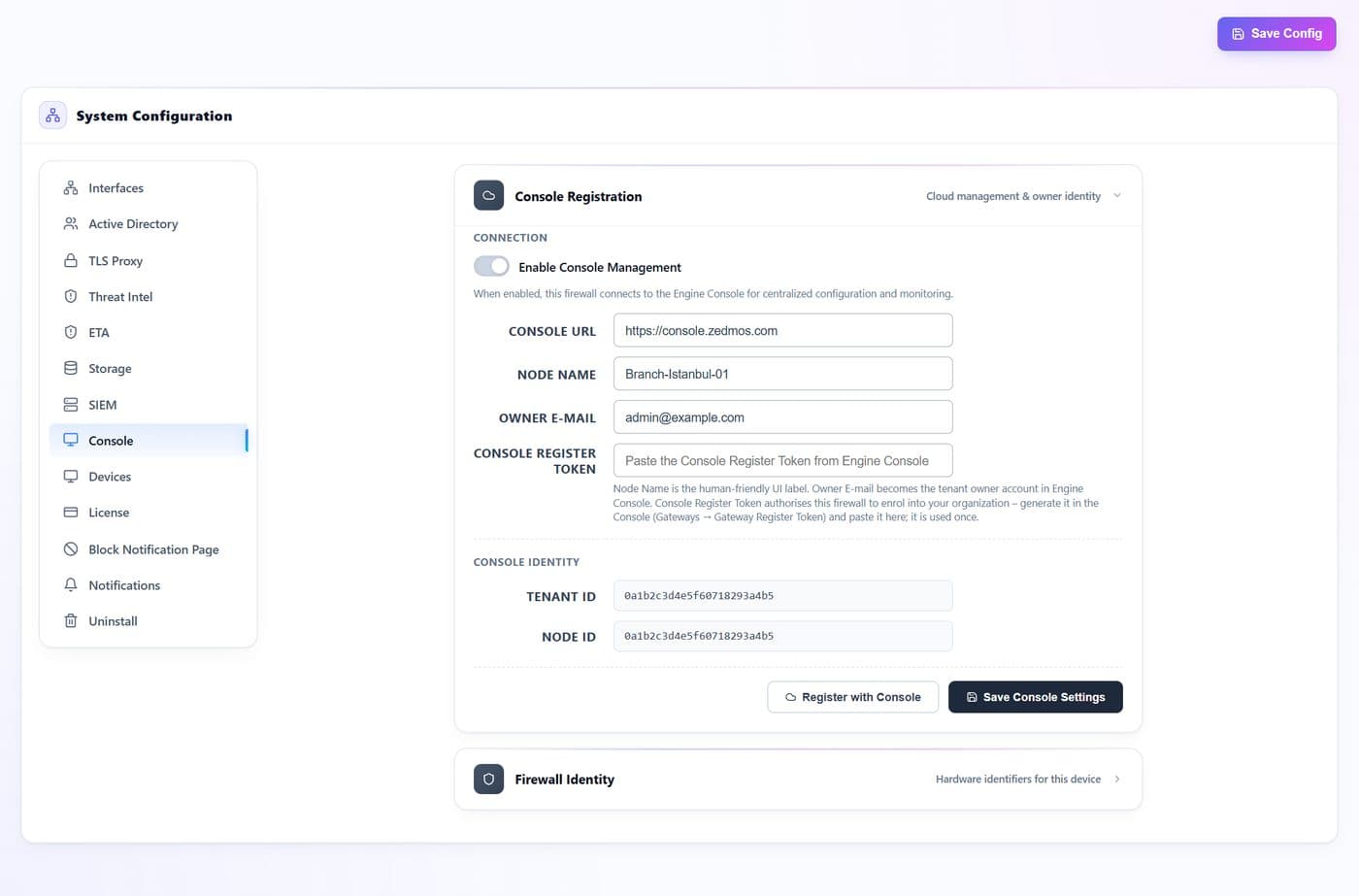
Links this appliance to the cloud console so it can be managed centrally. Registration is a one-time exchange; after it the appliance keeps its own outbound connection open.
- 1
- 2
- 3
- 4
- 5
- 6
| # | Control | What it does · how · why |
|---|---|---|
| 1 | Console URLtext | Where the console lives. The default is correct unless you run a private console. |
| 2 | Node nametext | How this appliance appears in the console gateway list. Use something an operator would recognise at 3am — site and role, not a serial number. |
| 3 | Owner emailtext | The console account this appliance is claimed by. |
| 4 | Register tokentext | A one-time token generated in the console. It proves the appliance may join your tenant. |
| 5 | Register with Consolebutton | Performs the enrolment exchange and starts the agent. |
| 6 | Save Console Settingsbutton | Stores the settings without re-registering — use it to rename the node. |
Devices
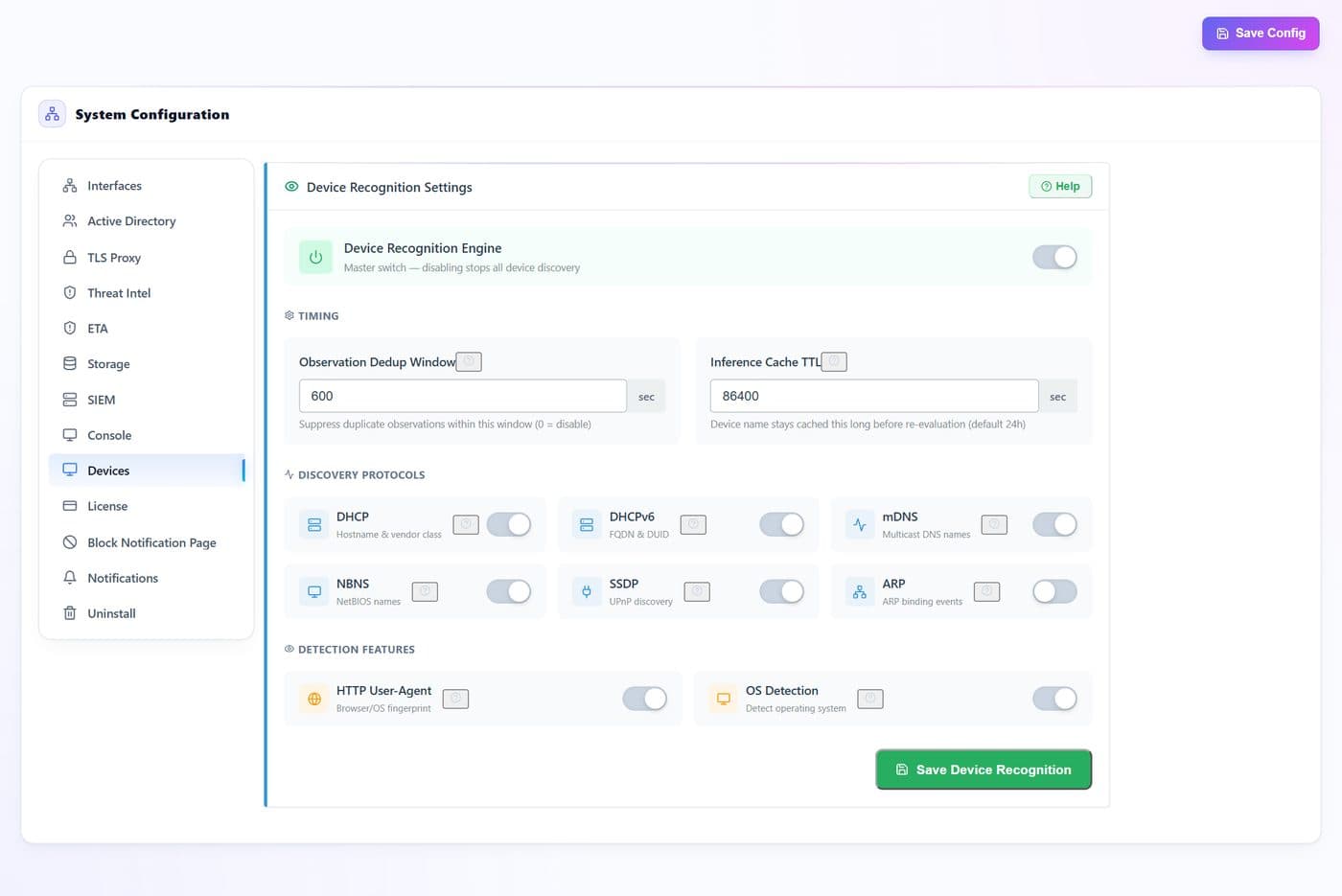
How the appliance recognises the devices on your network. Better recognition means device selectors and device categories in policies actually match.
- 1
- 2
- 3
- 4
| # | Control | What it does · how · why |
|---|---|---|
| 1 | Deduplication windownum | How long, in seconds, before the same device is treated as a new sighting. Raise it on noisy networks. |
| 2 | Inference lifetimenum | How long an inferred attribute — the guessed operating system, say — is trusted before it must be seen again. |
| 3 | Discovery sourcesbutton | Which signals feed recognition: DHCP and DHCPv6 leases, mDNS and NBNS names, SSDP announcements, ARP, HTTP user agents and passive OS fingerprinting. Turn one off if it produces noise on your network. |
| 4 | Save Device Recognitionbutton | Applies the recognition settings. |
License
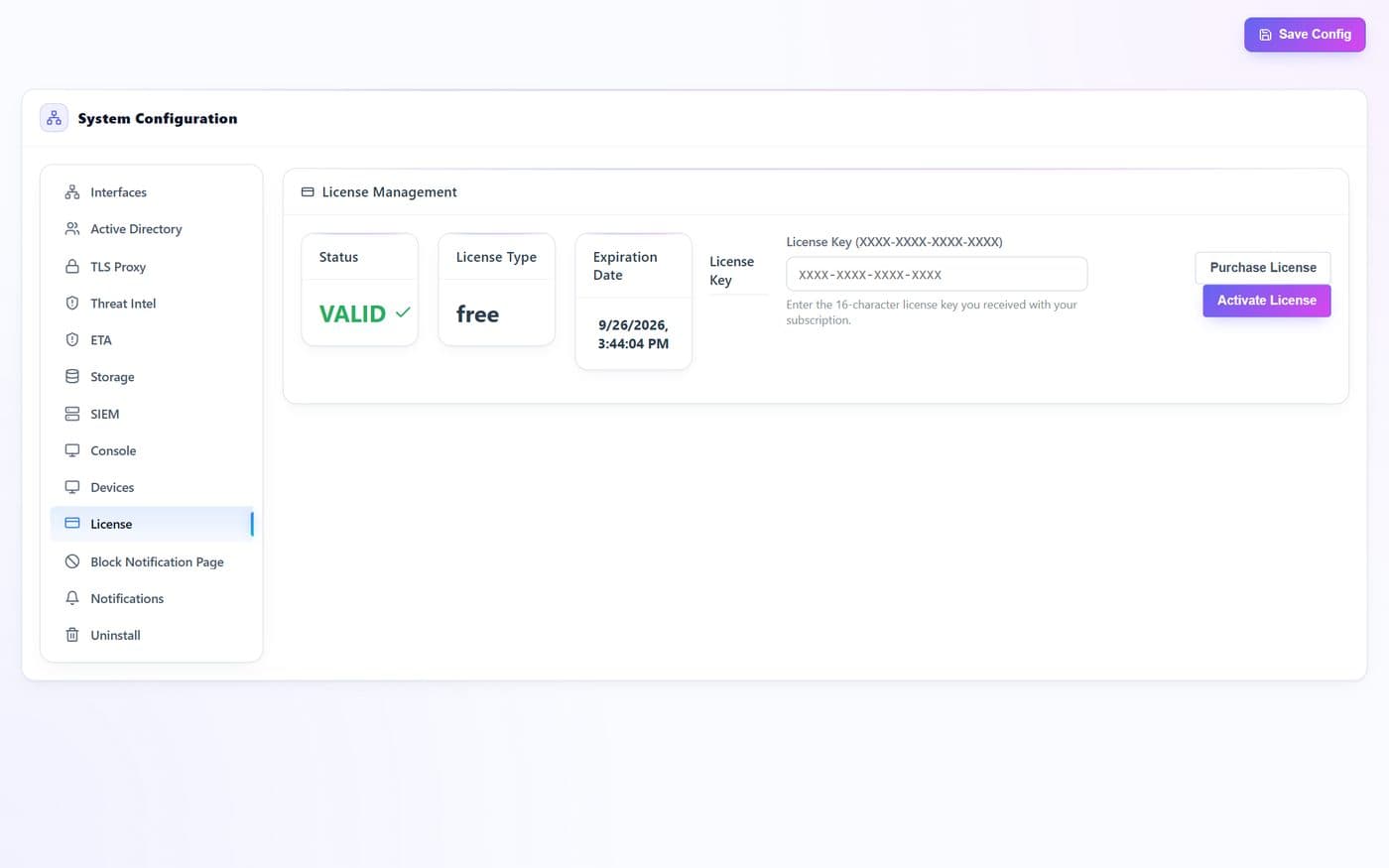
Licence status and activation.
- 1
- 2
- 3
| # | Control | What it does · how · why |
|---|---|---|
| 1 | Licence keytext | Paste the key you were issued and activate. |
| 2 | Activate Licensebutton | Validates the key and unlocks the licensed capabilities. |
| 3 | Purchase Licensebutton | Opens the purchase flow. |
Block Notification Page
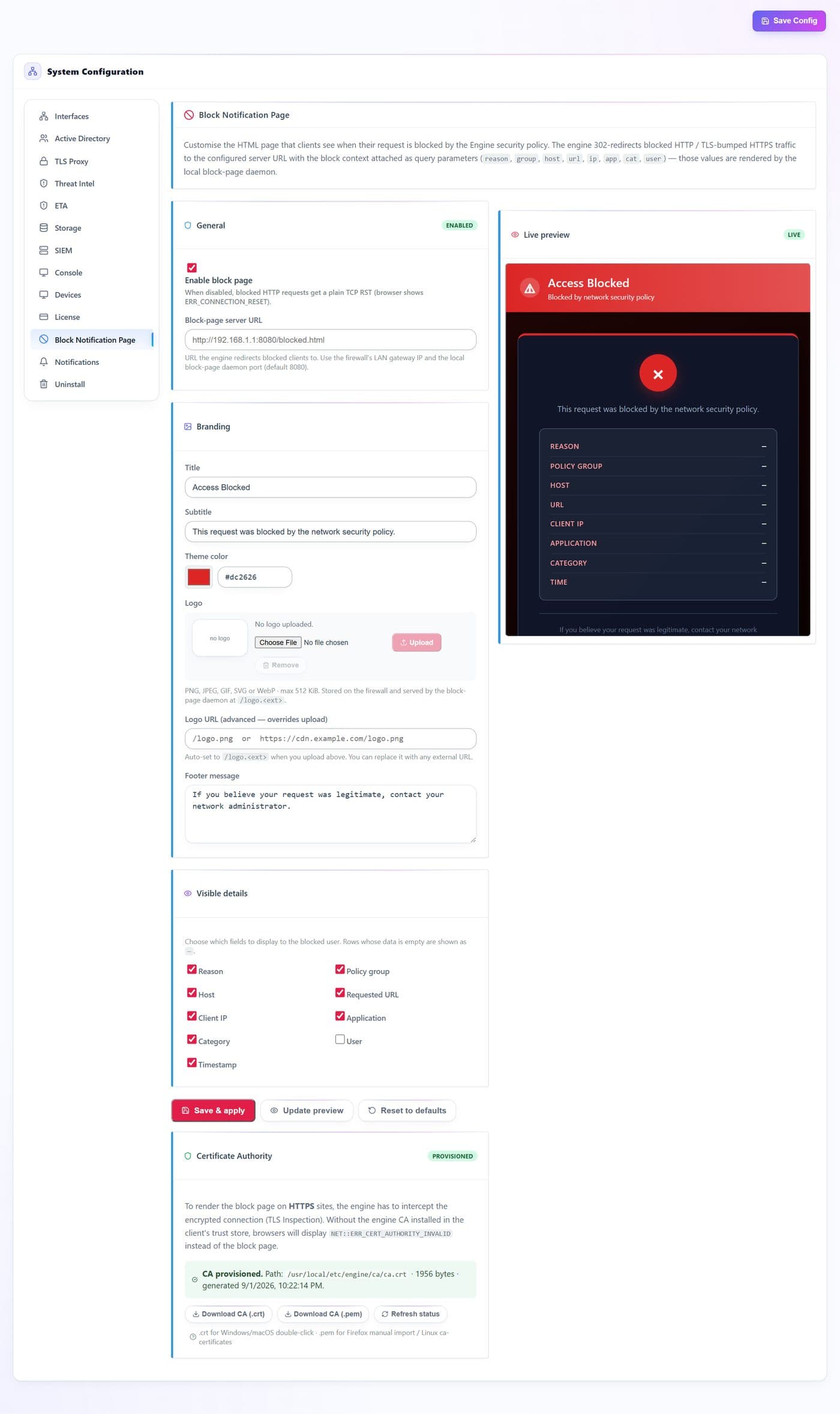
The page a user sees when something is blocked. A clear block page turns a mysterious failure into a self-explanatory one and cuts help-desk tickets.
- 1
- 2
- 3
- 4
- 5
- 6
- 7
- 8
- 9
| # | Control | What it does · how · why |
|---|---|---|
| 1 | Enable block pagetoggle | Serve a branded page instead of dropping the connection silently. |
| 2 | External page URLtext | Redirect to a page you host instead of the built-in one — useful if you already run a portal. |
| 3 | Title and messagetext | The headline and body a user reads. Say what happened and what to do next. |
| 4 | Accent colourtext | Brand colour for the page. |
| 5 | Logobutton | Upload a logo, or point at one you already host. |
| 6 | Contact texttext | The line that tells a user how to request a review. |
| 7 | Visible detailstoggle | Which facts the page reveals — the category, the policy, the address, the time. Show enough to be useful without leaking your ruleset. |
| 8 | CA download linksbutton | Lets a user install the trust certificate straight from the block page. |
| 9 | Save & applybutton | Publishes the page. Use Update preview to see it first. |
Notifications
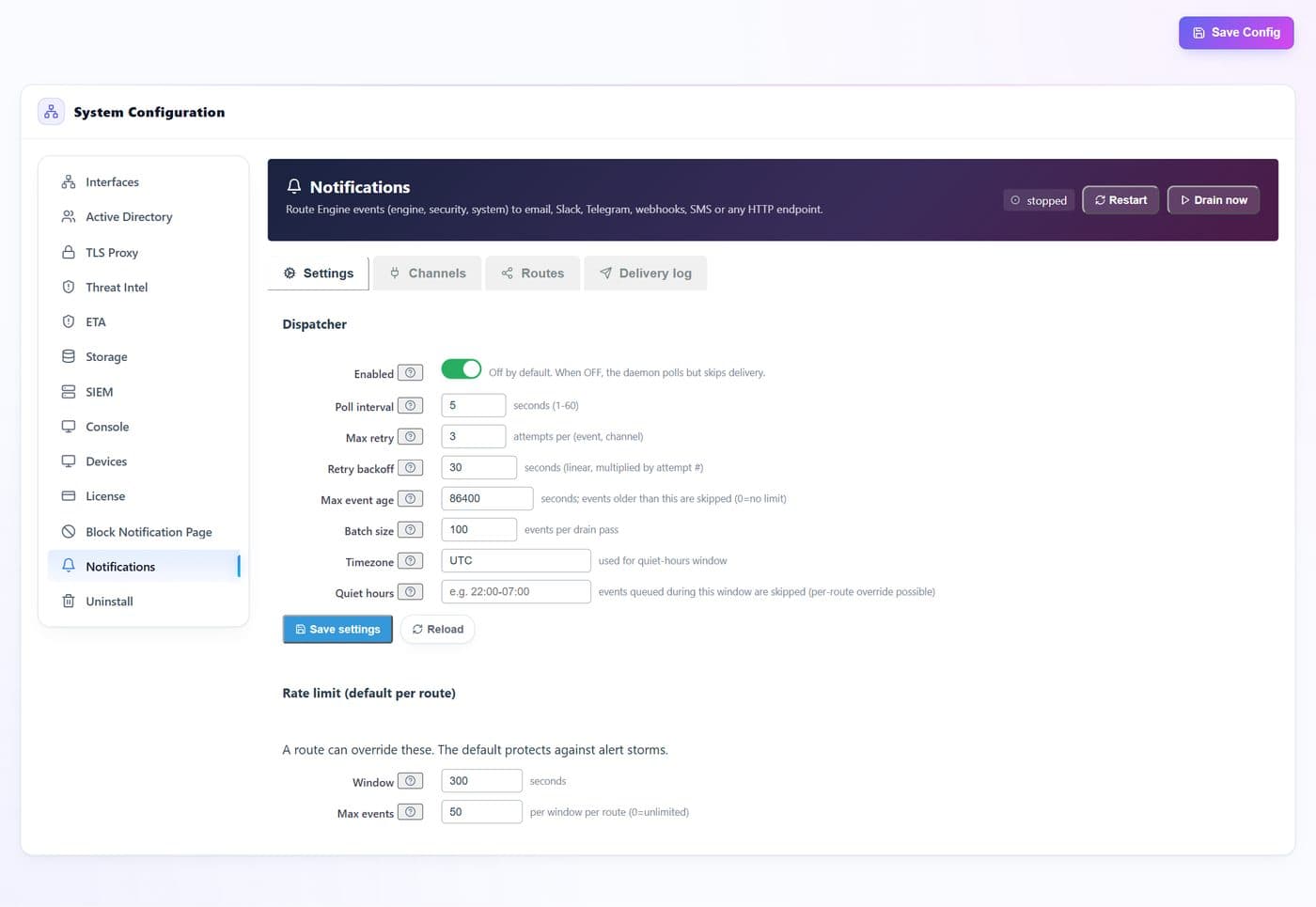
The dispatcher that delivers alerts, and the channels and routes it delivers them through. The Notifications page decides what is worth an alert; this decides where it goes.
- 1
- 2
- 3
- 4
- 5
| # | Control | What it does · how · why |
|---|---|---|
| 1 | Restart · Drain nowbutton | Restart the dispatcher, or flush its queue immediately instead of waiting for the next cycle. |
| 2 | Settingsbutton | Dispatcher behaviour and the default per-route rate limit. |
| 3 | Channelsbutton | Where alerts can go — email, webhook, syslog and the rest. A channel is configured once and reused by many routes. |
| 4 | Routesbutton | Which events go to which channel, with their own rate limit. This is where severity is turned into a destination. |
| 5 | Delivery logbutton | What was sent, what failed and why — the first place to look when an alert did not arrive. |
Uninstall
Removes the engine from the appliance.
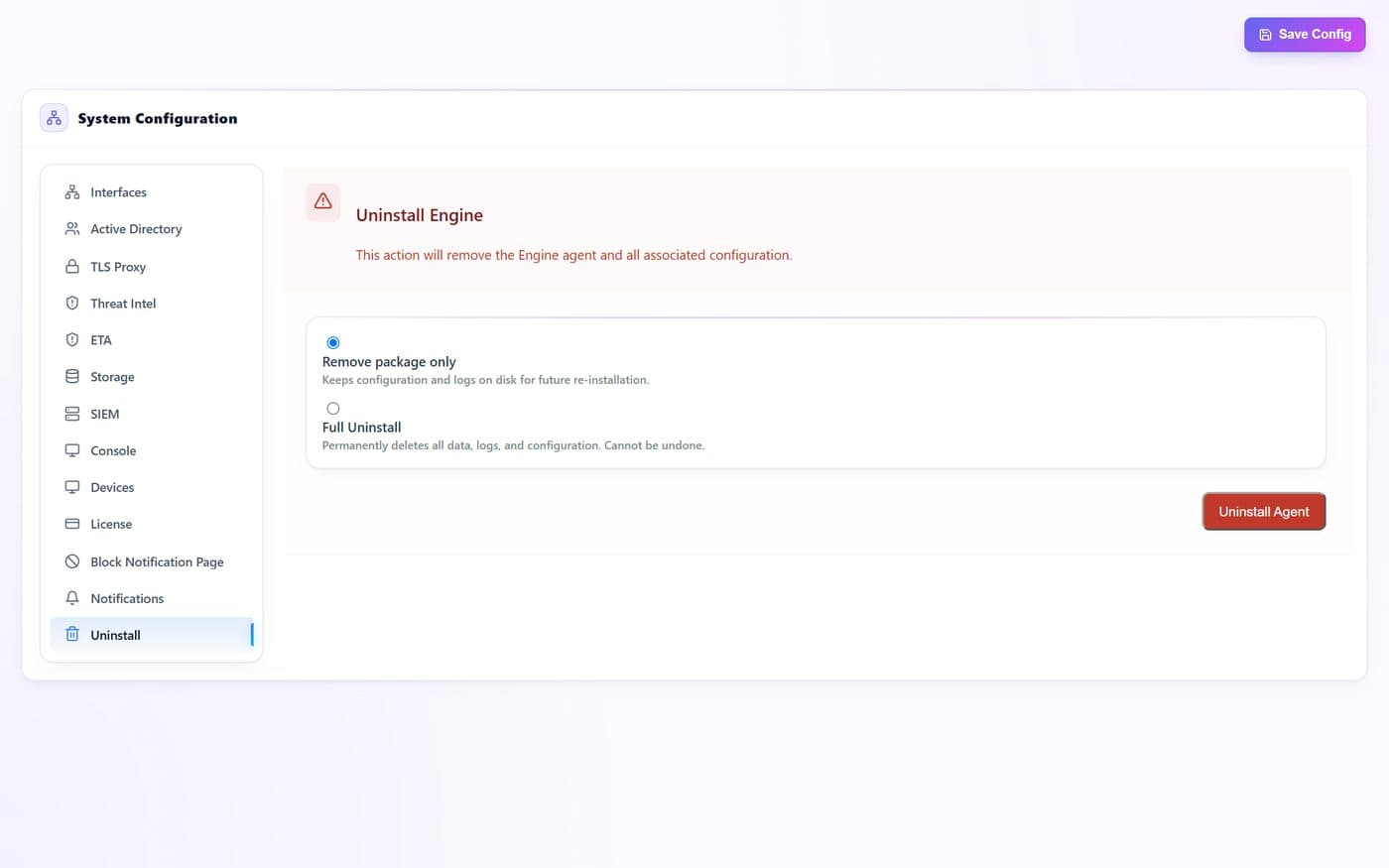
- 1
| # | Control | What it does · how · why |
|---|---|---|
| 1 | Uninstallbutton | Detaches the engine, releases the interfaces and removes the service. Configuration and recorded data are handled as the page describes. |