Zedmos

Secure access

The same inspection, for people who are not at a desk

The access half of SASE: a remote worker gets a tunnel to the hub, and the traffic inside it meets the policy that would have applied in the office. Not a separate cloud with separate rules.

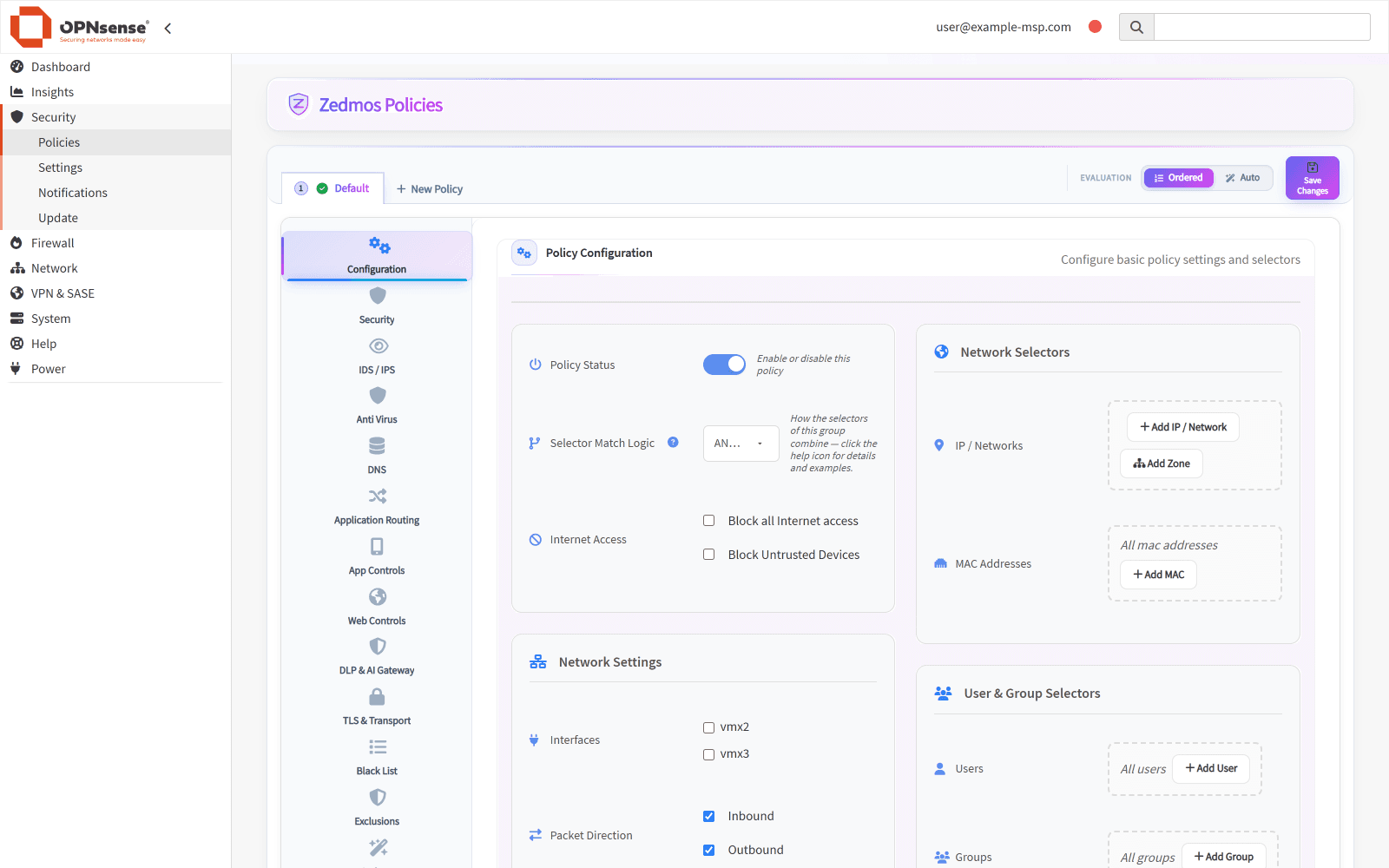
The Zedmos policy editor inside OPNsense with sections for security, IDS/IPS, antivirus, DNS, application routing, DLP & AI gateway and TLS.
One policy: IDS/IPS, DLP & AI gateway, TLS and routing in one editorOPNsense · os-zedmos
SASE overlay · one policy at the hubstand-by · same configurationSitesHead office10.0.1.0/24Branch10.0.2.0/24Warehouse10.0.3.0/24Remote workerper-device keyPrimary hubterminates · inspects · forwardsBackup hubstand-bytakes the spokes over when the primary stops answeringIdentity · Active Directory · Azure AD · SCIMEvery session meetsApplication controlIDS / IPSTLS inspectionDLP & AI gatewayInternet & SaaSone policy for all of ittunnel upstand-byEncrypted overlay · WireGuard, OpenVPN or GRE

How a site and a person get connected

Four steps, and only the first two need anyone. Keys are generated on each device and never travel; the console distributes the public half and nothing else.

  1. You

    Pick a hub

    One site becomes the hub — usually the one with a fixed address and the room to inspect. Every other site is a spoke; nothing needs a fixed address but the hub.

  2. You

    Add the sites

    Adding a site to the topology writes the configuration for both ends of the tunnel at once — the spoke and the matching change on the hub — so the two cannot drift apart.

  3. Zedmos

    Spokes dial out

    Each spoke establishes the tunnel outbound to the hub. That is why a branch on a consumer line with a changing address works without anyone opening a port for it.

  4. Zedmos

    People enrol their own devices

    A remote user opens a one-time link; their device makes its own key and receives the routes it is entitled to. Losing a laptop revokes that device and leaves their others working.

0
Private keys we ever see
3
Directory sources
Split
Default tunnel scope
No
Per-seat client licence

How access is granted and taken away

The private key never leaves the laptop

Enrolment is a one-time link plus a separate password sent another way. The browser generates the keypair on the user's own machine and sends only the public half. There is no field for a private key anywhere in the system, because there is nothing to put in it.

Split tunnel by default, full tunnel done properly

By default only corporate ranges go through the tunnel. Full tunnel is a switch, and it is built as an explicit list of internet prefixes rather than a blanket default route, so the user's own home printer keeps working and the tunnel's own handshake is never routed back into itself.

Inspection happens at the hub

Remote traffic lands on the hub and meets the whole engine there: application control, category and URL filtering, IDS/IPS, TLS inspection, data loss prevention and the AI gateway. A spoke used as an exit point forwards and translates; it does not inspect. Knowing which box does the work matters when you size them.

Choose where a user's traffic exits

Out of the hub, out of a named site, or out of whichever site is nearest to where the user enrolled. Useful when a service only accepts connections from one country's address space.

Identity, and what it actually takes

Users and groups come from Active Directory, Azure AD or SCIM, and policy selects on them by name. Remote tunnel users are identified from the moment they connect — their address is issued at enrolment, so the person is known without any extra plumbing. On the LAN, the domain-controller agent supplies the same binding for everyone else.

Devices are recognised, not assessed

The engine works out what every device is from traffic it already sees — DHCP, mDNS, ARP, user agents, SSH banners — with no agent to deploy and nothing for the user to install. Policy selects on the result: this printer, that class of handset, anything unrecognised.